Working in industries like renewable energy, utilities, manufacturing, and aviation, you probably already have a CMMS. Often it’s IBM Maximo, SAP, or Microsoft Dynamics, and it holds every asset, every maintenance activity, and every piece of pending work. So when it comes to managing inspections, do you need dedicated software, or can your CMMS do the job?
This guide is for maintenance, operations, and HSE leads who already run a CMMS or EAM and want an answer to a narrower question: is there a gap between what happens in the field and what reaches your system of record, and is it worth closing? You’ll find a side-by-side comparison, a test for when your CMMS is enough, the questions IT will ask, and the questions to ask any vendor before you buy.
Contents:
What Is a CMMS?
What Is Inspection Management Software?
- Inspection Management Software vs CMMS
Where CMMS Inspections Work, and Where They Can Stall
What IT and HQ Will Ask Before You Add an Inspection Tool
Questions to Ask Any Vendor Before You Buy
How Inspection Findings Become CMMS Work Orders
Integration Options: How the Two Systems Talk
How Fluix Works Alongside Your CMMS
FAQ
What Is a CMMS?
A CMMS (computerized maintenance management system) is software that plans, schedules, and records maintenance work. Its central record is the work order: what needs fixing, on which asset, by whom, with which parts, and at what cost. Planners, supervisors, and technicians use it to run preventive maintenance, track spare parts, and build an asset’s service history.
In many organizations, the CMMS, or the ERP it sits in, is the backbone. It’s the system of record, and every other tool is judged by whether it feeds it cleanly. Common examples include IBM Maximo, SAP Plant Maintenance, Microsoft Dynamics 365, MaintainX, UpKeep, Fiix, and Limble.
What Is Inspection Management Software?
Inspection management software is software for planning, conducting, and documenting inspections in the field. Its central record is the inspection: checklist answers, photos, measurements, signatures, and timestamps that prove an asset’s condition at a point in time. It routes failed items to approvals and corrective actions, and works offline for crews at remote sites.
Its job is narrower than a CMMS’s. It makes sure the inspection is actually done, completely and with evidence, by whoever is on site, contractors included, and then hands the result to your system of record. For the full workflow, here’s how inspection management software works stage by stage.
Inspection Management Software vs CMMS
| Inspection management software | CMMS | |
|---|---|---|
| Role in your stack | Field capture and evidence layer | Maintenance system of record |
| Central record | The inspection | The work order |
| Asset register | Reads or syncs it | Owns it |
| Main users | Technicians, inspectors, contractors | Planners, technicians, storeroom staff |
| Data captured | Checklist answers, annotated photos, readings, signatures | Labor, parts, failure codes, completion notes, costs |
| Offline work | Core requirement | Varies by mobile app, tier, and configuration |
| Contractors and occasional users | Often built for them; check licensing | Usually need paid seats |
| Typical decision-maker | Operations, HSE, or quality lead, with IT sign-off | Maintenance manager and IT |
| Typical rollout | Weeks; can pilot one workflow | Months |
The short version: the inspection system proves why work is needed, and the CMMS manages how it gets done.
Related: Compare the best inspection management software for field teams
Where CMMS Inspections Work, and Where They Can Stall
Let’s start with the good news for your CMMS. Many teams run inspections inside it successfully. There are cases when things break down, and it’s usually in one of four places.
- Offline, with more than one crew. Many CMMS mobile apps offer offline mode, but results vary by configuration. Even when offline works, it isn’t always enough. An offshore installation manager, for example, can have the real problem when 10–12 crews on overlapping shifts can’t see what the previous team has finished.
- A seat for everyone in the field. CMMS pricing is usually per user. As of 2026, MaintainX Premium lists at $65 per user per month (billed annually) and Fiix Professional at $75. That adds up when inspections are done by contractors, OEM service partners, or seasonal crews who will never plan a work order.
- Evidence that matches someone else’s format. A work order records what was done. Regulators, insurers, and asset owners often want more: the original checklist, a photo for each finding, readings, and signatures, in their report format.
- Paper next to the system. Having a CMMS doesn’t mean you have paperless inspections. Paper is still the fastest method across hundreds of thousands of modules for many teams. At some high-pressure gas sites, phones aren’t allowed at all. In ATS and Plant Engineering’s Industrial Maintenance 2020 report, about half of respondents used a CMMS, while 46% still used paper or clipboards.
Do You Need Both?
Your CMMS Is Probably Enough If…
- Inspections are short internal checks completed by people who already have CMMS licenses.
- Your sites have reliable connectivity, or offline already works for your crews.
- Nobody outside the company needs a formatted inspection report.
- Your forms rarely change.
- Field capture is already paperless.
In that case, a separate inspection tool is overhead. Don’t buy one.
An Inspection Tool Pays Off When…
- Contractors or service partners submit findings but don’t have, and shouldn’t need, CMMS accounts.
- Several crews work offline on the same assets, and handovers get lost between shifts.
- Paper persists at some sites despite the CMMS.
- Clients or regulators expect signed, photo-rich reports in a specific format.
- Forms change faster than your CMMS team can update them. New sites, OEM requirements, or regulations all mean form changes.
- Your tools are fragmented. Several prospects described separate, unconnected tools for different teams and wanted one way to get field data into one place.
Adoption also decides the outcome. Field crews are the ones who choose whether a system gets used. “Technicians are very protective of their experience. And they should be.” Gyner Ozgul, CEO, Fortis Fire & Safety, Field Intelligence #5.
When to Wait
If you’re in the middle of an ERP rollout or a company-wide CMMS implementation, finish it first. Adding a field layer during a core-system project usually means competing for the same budget, the same IT team, and the same people’s attention. Come back once the core system is stable and you can see where field data still falls through.
What IT and HQ Will Ask Before You Add an Inspection Tool
People who need software for field usage are typically not the ones who could approve a new tool. Decisions sat with an IT office, a headquarters team, or a parent company with its own standard software. Many integration requests are turned down because people don’t get internal approvals. In some companies, the approval process can take years.
If you want an inspection layer approved, expect these questions and prepare answers before you raise it:
- Which direction does data flow? Does the tool only read from the CMMS, only write to it, or both? Write access gets more scrutiny.
- How does it connect? Exports, webhooks, an integration platform, or a direct API. Who builds the connection, and who maintains it?
- Will it duplicate anything? IT will want a clear split: the CMMS owns assets, schedules, and work orders; the inspection tool owns forms, evidence, and approvals.
- Security and access. Security certifications, single sign-on, data location, and how user access is removed when someone leaves.
- Does it fit the corporate standard? If HQ mandates SharePoint or a specific platform, how does the new tool coexist with it?
- Who maintains the forms? Can the operations team change a checklist, or does every change need IT?
- Contractor licensing. How do external users get access, and what does it cost?
- Exit plan. If you stop using the tool, can you export all inspection records in a usable format?
Questions to Ask Any Vendor Before You Buy
- Does your CMMS have an API? Start here, before any demo. If it doesn’t, there is no way to push inspection data into it. No vendor can fix that for you.
- Can you show the integration working with our system? Ask for a live example with your CMMS, not a slide saying “integrates with everything.”
- Will this duplicate our CMMS? The vendor should be able to say exactly which records live where.
- What happens offline with several crews on the same site?
- How do contractors submit inspections, and what does that cost?
- Is it easier for field crews than what they use now? Have two or three technicians try it during the trial, not just managers.
- Can we pilot one inspection type at one site first? If the only option is a full platform rollout, that’s a warning sign.
How Inspection Findings Become CMMS Work Orders
When the two systems work together, ownership is simple. The CMMS owns assets and work orders. The inspection system owns evidence and findings. Asset IDs flow down to the field, findings flow up as pending work, and close-out status flows back.
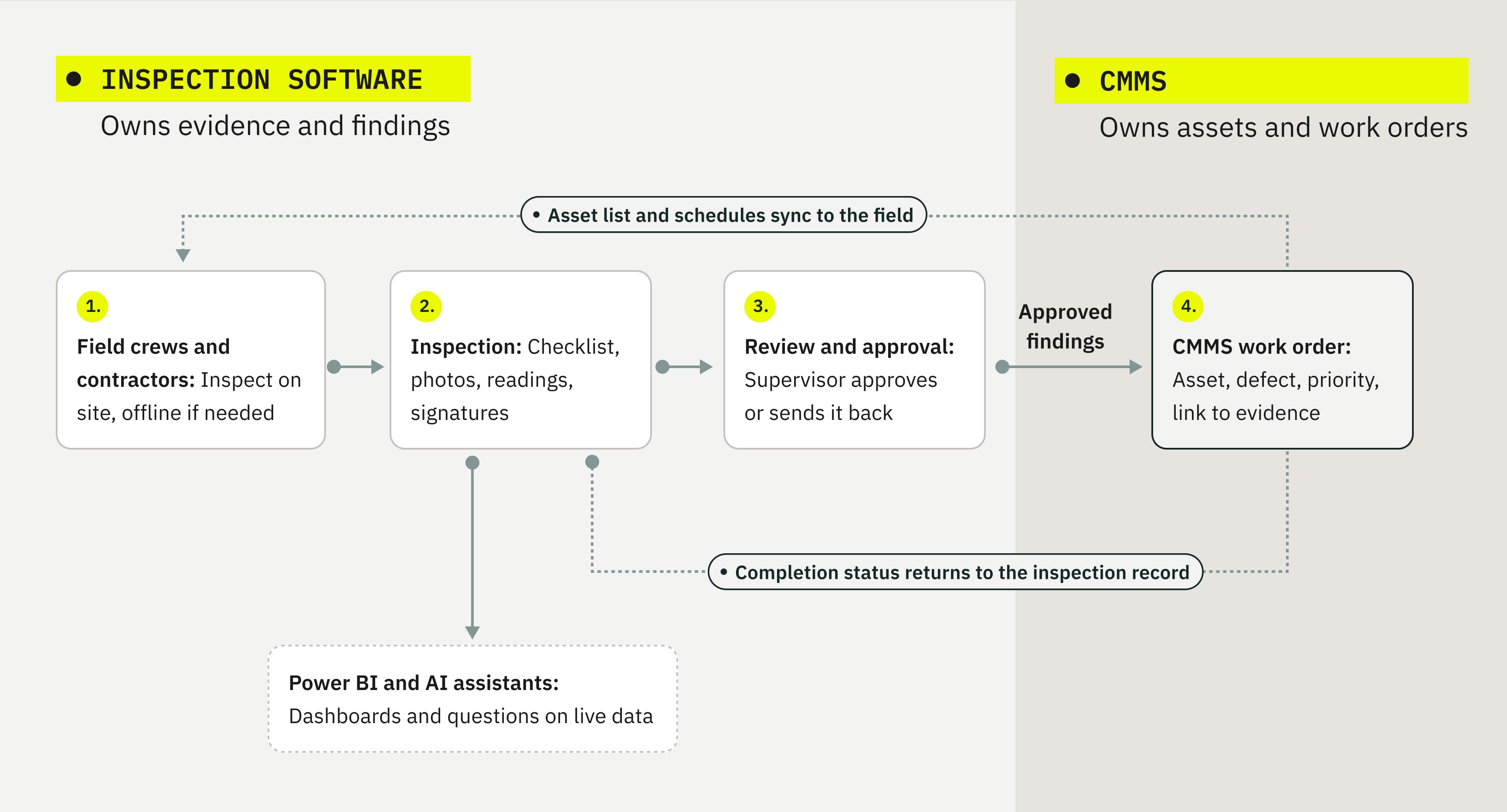
- The asset list and inspection schedule sync from your CMMS.
- A crew inspects, offline if needed.
- A failed check creates a finding with photos and readings attached.
- A supervisor approves it or sends it back with questions.
- The approved finding becomes a work order or request in the CMMS.
- When the work is completed, the status returns to the inspection record.
This matters because a finding that sits in a PDF never gets fixed. Siemens’ True Cost of Downtime 2024 report estimates that unplanned downtime costs the world’s 500 largest companies 11% of their revenue, about $1.4 trillion a year.
Industry Examples
Wind. A technician photographs leading-edge erosion from the nacelle. The approved finding becomes a work order with the component and photos attached, and the next crew on shift can see it’s already been logged. RWE Renewables cut inspection form completion time by 45% with Fluix.
Solar. Inspections cover hundreds of thousands of modules. Asset details are pre-filled by serial number, and findings are grouped by string or inverter, so the CMMS receives a handful of actionable requests instead of hundreds of separate ones.
HVAC. A refrigerant leak found on a rooftop unit becomes pending work for a licensed technician, with pressure readings and photos attached.
Manufacturing. An operator round spots wear on a conveyor guard. The finding becomes a CMMS request noting when the line can be stopped, so planners can fit the fix into a production window.
Integration Options: How the Two Systems Talk
From least to most effort:
File exports. Completed inspections are saved as PDF or CSV files to SharePoint, OneDrive, or Google Drive, where your CMMS team picks them up. Simple, but someone still has to act on them.
Business intelligence. Inspection data flows into Power BI next to your CMMS data, so you can see which assets keep failing inspections and whether work orders keep up.
Webhooks and integration platforms. Completed inspections trigger an automation that sends data to your CMMS through its API.
Direct API work. For systems like Maximo or SAP, a direct connection is usually built through the CMMS’s API. Scope it with both vendors before you commit.
AI assistants. With the Fluix MCP connector for AI assistants, a manager can ask “Which sites have corrective actions open for more than 14 days?” and get an answer from live inspection data. The connector is read-only and respects your existing permissions, so it doesn’t touch your system of record.
Note that AI only works as well as the data behind it. In UpKeep’s State of Maintenance Report 2026, 71% of maintenance professionals rated their data readiness for AI as inadequate. Better AI starts with complete, structured inspection data from the field.
How Fluix Works Alongside Your CMMS
Fluix is inspection management software for field teams. It isn’t a CMMS, and it isn’t meant to replace yours. It sits between your field crews and the system you already run:
- Inspections that work offline, with photos, readings, and signatures, synced when crews are back online.
- Access for contractors through guest access, without a full license.
- Approvals before anything reaches the CMMS, so only complete, reviewed findings become work.
- Corrective actions with owners and due dates, tracked until they’re closed.
- Forms your operations team can change without waiting on IT.
- Data that reaches your other systems through exports, Power BI, webhooks, integrations, and the MCP connector.
Swire Renewable Energy, which inspects and repairs turbines for OEMs and wind farm owners, has completed more than 55,000 inspection documents in Fluix. That kind of contractor-to-owner data flow is hard to run through a CMMS alone.
FAQ
- We already have a CMMS for all our maintenance activities. Why would we add another tool?
You may not need to. If your CMMS checklists are completed on time, work offline where needed, and produce the evidence auditors and clients ask for, keep using them. An inspection layer pays off only where those break down: contractors without seats, crews working offline across shifts, paper at some sites, or reports in someone else’s format.
2. Will an inspection tool duplicate our CMMS?
It shouldn’t. Split ownership clearly: the CMMS keeps the asset register, preventive schedules, work orders, parts, and costs; the inspection tool keeps forms, evidence, and approvals, and sends findings back. If a vendor can’t explain that split for your setup, don’t buy. Here’s what a complete work order contains.
3. Our CMMS is our single source of truth. Where does inspection data live?
The evidence (checklist answers, photos, signatures) lives in the inspection system, because that’s what auditors ask for. What the CMMS needs (asset ID, defect, priority, and a link to the evidence) goes into the CMMS as a work order or request. Your system of record stays complete without storing every inspection photo.
4. Does it integrate with IBM Maximo or SAP?
Connections to Maximo and SAP are usually built through their APIs, using webhooks, an integration platform, or a custom build. Ask any vendor to show a working example with your system, and check which API access your CMMS license includes. See Fluix integrations for current options.
5. We just finished an SAP or CMMS rollout. Is now the right time?
Often not. Let the core system settle and see where field data still falls through: paper at some sites, contractors, offline crews. Then pilot one inspection type at one site. A field layer added during a core rollout competes for the same budget and attention.
6. Can subcontractors submit inspections without accounts in our CMMS?
Yes, if the inspection tool offers guest or link-based access. Contractors complete the form, attach photos, and sign. Approved findings then reach your CMMS without a seat for every subcontractor. Read how Swire Renewable Energymanages inspections for wind farm owners and OEMs.
7. Can an inspection tool coexist with a corporate standard like SharePoint?
Usually, yes. Many teams keep SharePoint as the document store and send completed, flattened inspection reports there automatically. The inspection tool handles capture and approvals; SharePoint stays the place people look for files.
8. What is the difference between a CMMS and an EAM?
A CMMS focuses on maintenance execution: work orders, preventive maintenance, parts, and labor. An EAM covers the full asset lifecycle, adding capital planning, procurement, depreciation, risk, and disposal. IBM Maximo and SAP are usually classed as EAM, while MaintainX, UpKeep, and Limble are typically CMMS. Read more in IBM’s overview of CMMS and EAM.