

Key takeaways:
- Excel can store inspection data, but it can’t prove who did what and when.
- Most teams are running a spreadsheet-based safety system: inspections in one file, incidents in another, corrective actions in email, training records somewhere else.
- Purpose-built software replaces that whole system with one connected workflow.
- Most teams can move their existing checklists across in under two weeks.
Excel is a reasonable place to start. It’s free, and you can build a checklist fast. But field inspections rarely stay in one spreadsheet. Most teams are running a small system of them, held together by email and whoever remembers to update it. If you’re still on paper rather than spreadsheets, our article about digital inspections covers that first step.
In this guide, I will explain where Excel falls short for field inspections and safety records, what the real alternatives are, and how to switch without disrupting your team.
Contents:
- Why Excel Falls Short for Field Inspections
- What Are the Alternatives to Spreadsheet-Based Safety Inspections?
- 5 Best Software Alternatives to Excel for Field Inspections
- 1. Fluix: Best for Field Inspections, Incidents, and Corrective Actions
- 2. Mitti (formerly SafetyCulture): Best for Fast Deployment with Inspections and Training in One Place
- 3. GoAudits: Best for Scored Audits Across Multiple Sites
- 4. TrueContext (formerly ProntoForms): Best for Enterprise Reporting and Integrations
- 5. Fulcrum: Best for Inspections Tied to Location Data
- Move from Excel to Fluix
- FAQs
Why Excel Falls Short for Field Inspections
Excel fails for field inspections because it can’t create a tamper-evident audit trail, track findings to closure, or prove when and where an inspection actually happened. It’s a data entry tool, often mistaken for a compliance system.
- No audit trail. Anyone with access can change a cell, and there’s no reliable record of who changed it, when, or what it said before. When an auditor or regulator asks you to prove an inspection was done on a specific date by a specific person, a spreadsheet can’t do it.
- Corrective actions disappear. A failed checklist item gets highlighted in yellow, mentioned in an email, or raised at a handover meeting. It doesn’t get a named owner, a deadline, and a recorded sign-off when it’s fixed.
- Photos are detached from findings. Field staff take photos on their phones, attach them to emails, or save them to a shared drive. Matching the right photo to the right finding six months later is guesswork.
- Offline doesn’t work. A spreadsheet on a shared drive needs a connection. On a remote site, offshore, or at height, there isn’t one — so inspections get written on paper and typed up later, and every entry is done twice.
- Everything lives in separate files. Inspections, incidents, corrective actions, and training records each end up in their own spreadsheet. Nothing connects, so seeing the full picture means cross-referencing files by hand.
What Are the Alternatives to Spreadsheet-Based Safety Inspections?
The real alternative to spreadsheet-based safety inspections is purpose-built inspection management software. It replaces the checklist, the photo folder, the email chain, and the manual report with mobile inspections that works on mobile, online or offline.
The best tools not just digitise your forms. They capture photo evidence on each finding, route failed items to a named person automatically, track the fix to closure, and generate an audit-ready record without anyone typing it up.
Here’s how the two approaches compare:
| Capability | Excel | Purpose-built inspection software |
|---|---|---|
| Audit trail | ❌ Anyone can edit; no reliable change history | ✅ Timestamped, attributable, tamper-evident records |
| Photo evidence | ❌ Separate folder, linked by hand | ✅ Attached to each finding at the point of capture |
| Corrective actions | ❌ Email threads and memory | ✅ Assigned to a named person, tracked, closed in the app |
| Incident reporting | ❌ Separate register, filled in later | ✅ Reported from the field and linked to follow-up actions |
| Training records | ❌ Separate matrix, updated manually | ✅ Available in some platforms, linked to the people doing the work |
| Offline access | ❌ Needs a shared drive connection | ✅ Works without signal, syncs on reconnect |
| GPS and location | ❌ No location data | ✅ GPS on every inspection |
| Multi-step approvals | ❌ Not possible | ✅ Senior reviewer signs off before a finding closes |
| Reports | ❌ Drafted and formatted by hand | ✅ Generated automatically on completion |
| Multi-site visibility | ❌ Files consolidated manually | ✅ One dashboard across all locations |
| Scheduling | ❌ Calendar reminders at best | ✅ Recurring schedules with automatic assignment |
For a safety or operations manager running inspections across several sites, the practical difference is simple. Instead of chasing completed spreadsheets and rebuilding a compliance summary every month, you open one dashboard and see what’s done, what’s overdue, and what still needs fixing.
5 Best Software Alternatives to Excel for Field Inspections
1. Fluix: Best for Field Inspections, Incidents, and Corrective Actions
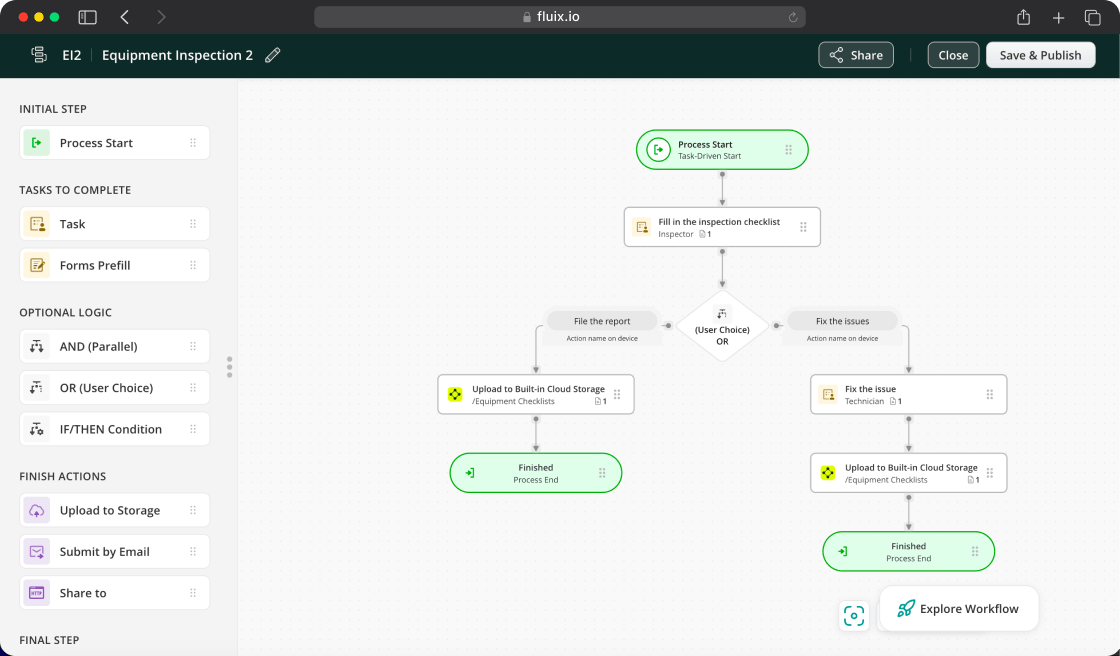
Fluix is inspection software that field teams across construction, wind energy, oil and gas, aviation, and utilities use to run safety inspections, incident reporting, work permits, and compliance documentation.
The difference from Excel isn’t just digital versus paper. It’s what happens after the checklist. In Excel, a completed inspection produces a file. In Fluix, it starts a process: a failed item becomes a corrective action assigned to a named person with a due date, a senior reviewer signs off before the record closes, and the report files itself. Incidents reported from the field follow the same route, so inspections, incidents, and fixes live in one place instead of three spreadsheets.
Fluix also solves the offline problem directly. Inspections, photos, e-signatures, and GPS timestamps all work without signal and sync when the connection returns.
“The fact that you can use Fluix offline is an absolute must for us. It means that technicians can work on a boat, from their car, or from the top of a turbine.”
James Bird, Maintenance Engineer, RWE Renewables
Ratings: 4.8 — Capterra · 4.8 — G2
Book a 30-minute discovery call with Fluix →
2. Mitti (formerly SafetyCulture): Best for Fast Deployment with Inspections and Training in One Place

Mitti (formerly SafetyCulture, originally iAuditor) is the platform many teams try first for safety inspections when they move off Excel. The template library exceeds 100,000 options, and the free plan is usable, so most teams are running their first digital inspection on day one.
It’s also the one tool on this list that covers safety training alongside inspections and incidents, with a built-in training module. That makes it a good fit if your spreadsheet system includes a training matrix you want to replace too.
Ratings: 4.6 — Capterra · 4.6 — G2
3. GoAudits: Best for Scored Audits Across Multiple Sites
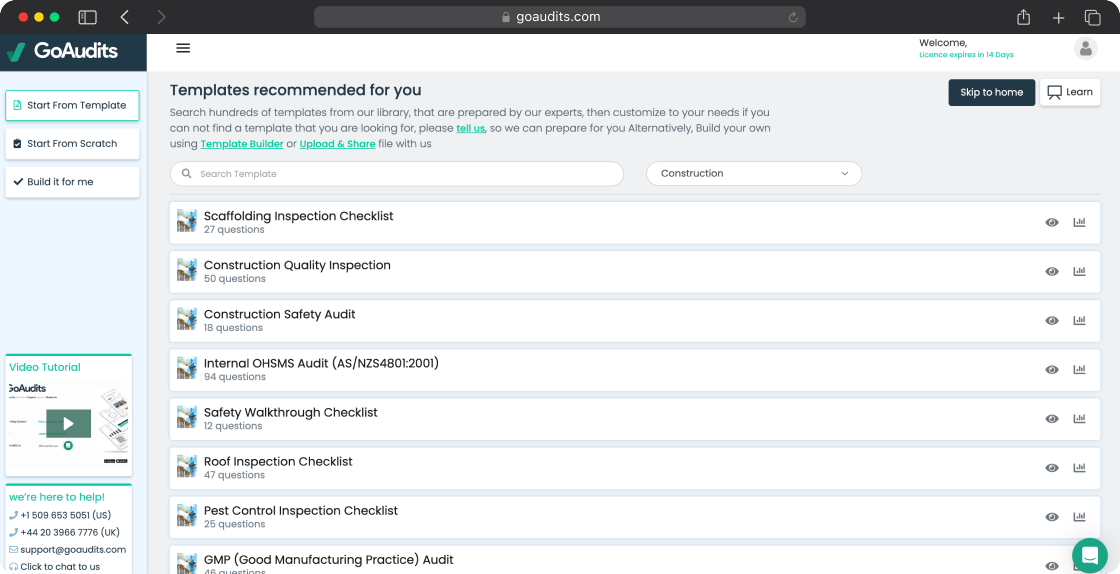
GoAudits is built around scored audits, corrective actions, and automatic PDF reports. It suits multi-site operators in hospitality, food and beverage, retail, and facilities who need repeatable audits with clear scores across locations. Offline mode, photo capture, and branded reports are included.
At $12/user/month it’s one of the most affordable options. The trade-off is workflow depth — it doesn’t offer multi-step approval chains or the document controls that oil and gas and aviation teams need.
4. TrueContext (formerly ProntoForms): Best for Enterprise Reporting and Integrations
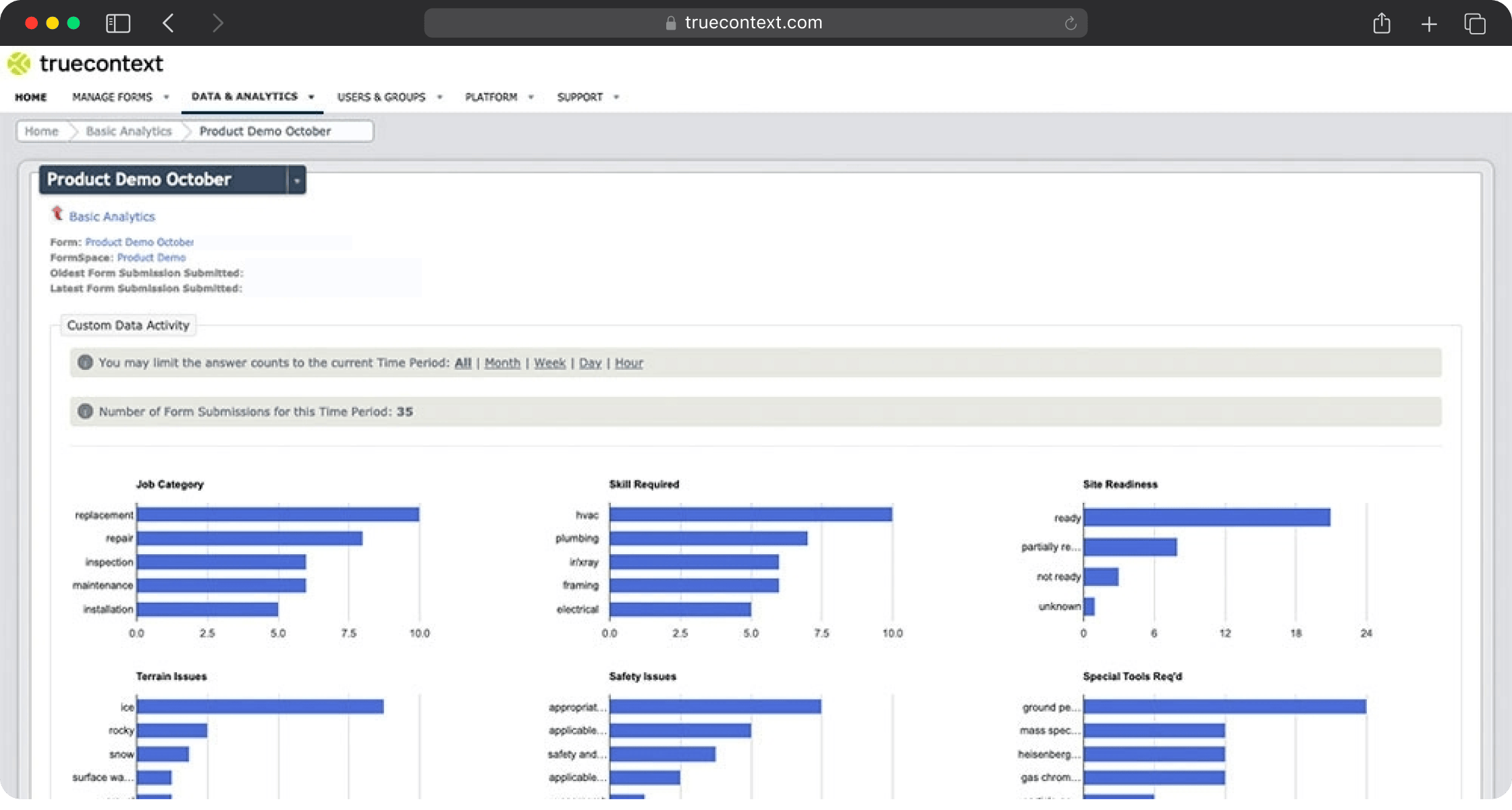
TrueContext is a field service workflow platform for enterprise inspections. Its main advantage over Excel is reporting: full control over PDF, Word, or Excel output, with your branding throughout. For teams that send inspection reports to clients in a fixed format, that removes a lot of manual formatting.
It connects natively to Salesforce, SAP, Oracle, and ServiceNow.
Ratings: 4.6 — Capterra · 4.5 — G2
5. Fulcrum: Best for Inspections Tied to Location Data

Fulcrum is a field data collection platform with strong GIS capabilities. For utilities, environmental, and infrastructure teams whose inspection records need to connect to maps, asset locations, and ArcGIS layers, Fulcrum handles what Excel can’t attempt.
Its FastFill AI fills in forms from photos and voice, and works offline.
Ratings: 4.7 — Capterra · 4.6 — G2
How to Replace Excel for Field Inspections: A Step-by-Step Guide
Switching from spreadsheets doesn’t need a long IT project. Most teams finish in under two weeks.
Step 1. List every spreadsheet in your safety system
Don’t stop at inspection checklists. List the incident register, corrective action tracker, and training matrix too, with who owns each one and how often it’s updated. This shows you what the new platform actually needs to replace.
Step 2. Choose software built for your field conditions
For construction, oil and gas, wind energy, aviation, and utilities, the must-haves are offline mode, a mobile interface that works with gloves on, photos attached to findings, automatic corrective action routing, multi-step approvals, and a dashboard that doesn’t need a separate reporting step. Ask whether the vendor migrates your existing templates for you.
Step 3. Pilot one inspection type at one site
Pick your most important recurring inspection and run it digitally for two weeks. Measure time per inspection, report turnaround, and how many corrective actions get closed.
Step 4. Move the crews off the spreadsheet
This is where most rollouts stall: the software is live, but people keep emailing spreadsheets because nobody said to stop. After the first digital inspection, show the crew the finished report — timestamped, with GPS and photos, generated with no typing up. That’s usually when it clicks.
Step 5. Bring the other spreadsheets across
Once inspections are running, move the incident register and corrective action tracker onto the same platform, so writing incident reports and following up on them happens in the same place as your inspections.. Then roll the setup out across all sites.
Move from Excel to Fluix
Fluix is safety inspection software built for field teams in regulated industries. Here’s what it brings to the switch:
- Template migration. The Customer Success team turns your existing Excel checklists into digital forms during onboarding.
- One system instead of several spreadsheets. Inspections, incidents, and corrective actions connected in one workflow.
- Full offline mode. Inspections, photos, GPS, and e-signatures captured anywhere.
- Automatic corrective actions. Every failed item assigned to a named owner with a due date.
- Multi-step approvals. A senior reviewer signs off before a finding closes.
- A real audit trail. Every record timestamped, attributed, and stored with its history.
Rated 4.8 on Capterra and G2, Fluix is used by field teams at RWE Renewables, Siemens Gamesa, CPP Australia, Dyna Crane, and thousands of other organisations.
Book a 30-minute discovery call → or Start a free trial →
FAQs
- What is the best alternative to Excel for field inspections?
Purpose-built inspection management software. Fluix is the strongest option for regulated field industries where offline reliability, multi-step approvals, and audit-ready records are required. Mitti (formerly SafetyCulture) is fastest to deploy and includes training. GoAudits is the most affordable for scored multi-site audits.
2. Which industries need an Excel alternative most?
- Wind energy. Technicians work at height and offshore, where a spreadsheet on a shared drive can’t be opened. O&M contracts and regulators expect a complete corrective action trail.
- Oil and gas. Remote sites have the same connectivity problem with a heavier regulatory load. OSHA, API, and operator safety programmes require timestamped, attributable records.
- Construction. Site photos sit on personal phones and get matched to checklist rows from memory — until an incident happens and a contractor needs to produce a defensible record.
- Aviation. Many maintenance teams still track checks in spreadsheets, but aircraft and ground operations inspections need specific document formats, e-signatures, and multi-stage sign-off. Excel can’t produce those natively.
- Utilities and facilities. Large equipment portfolios need recurring schedules, component-level findings, and links into maintenance systems. Spreadsheet trackers become unmanageable at scale.
2. What is the best software replacement for spreadsheets for incidents, inspections, and corrective actions?
A single platform that connects all three. Fluix links inspections, incident reporting, and corrective actions in one workflow, so every finding or incident becomes a tracked action with an owner. If you also need training records in the same system, Mitti includes a training module.
3. Is health and safety software better than spreadsheets?
For most teams, yes. Health and safety software gives you a reliable audit trail, photo evidence on each finding, automatic follow-up on corrective actions, and offline mobile access — none of which spreadsheets provide. A spreadsheet can still be enough for a single site with a handful of inspections a month and no regulatory reporting.
4. Why can’t spreadsheets provide a compliance audit trail?
Anyone with access can change a cell, change history is easily lost when files are copied or emailed, and photos and signatures sit outside the file. Inspection software records each entry with a name, timestamp, GPS location, photos, and an e-signature, and keeps a history of every change.
5. Can I import my existing Excel inspection checklists?
Yes. Most inspection software accepts existing templates. With Fluix, the Customer Success team builds digital versions of your Excel checklists during onboarding.
6. How long does it take to switch from Excel to inspection software?
Most teams finish in two to four weeks, including template setup, a pilot, and team training.
7. Does inspection software work without internet access?
The best tools do. Fluix captures inspections, photos, GPS timestamps, and e-signatures offline and syncs automatically when the connection returns. Test offline mode with photos during any trial before committing.
8. Is Excel ever enough for field inspections?
For a single site, a few inspections a month, and no regulatory reporting, Excel can work. Once you add a second site, need corrective actions followed up, or have to prove compliance to an auditor, it becomes a liability.