
If your team runs field inspections, you probably know SafetyCulture (or its predecessor iAuditor), the tool that puts digital checklists in the hands of field teams. The platform made safety inspections accessible with a large template library and friendly mobile app.
But if your inspections involve more than filled forms — multi-step approvals, conditional routing of findings, workflows that branch across dozens of scenarios — that is where Fluix comes in. Fluix is inspection management software built specifically for complex field operations: dispersed teams, regulated environments, and inspection programs where a single workflow can involve multiple paths.
That is why the Fluix vs SafetyCulture decision exists. Both platforms manage inspections, but have different approaches. I have spent over a decade as Product Lead at Fluix evaluating inspection tools, including SafetyCulture. In this guide, I will walk you through how they differ, and what actually matters when making your choice.
Note: SafetyCulture rebranded to Mitti in August 2026, but the product, team, and pricing are unchanged. Throughout this article I use “SafetyCulture” because that is the name most readers still know and recognize, and “Mitti” when referring to the current product state.
Contents:
- Fluix vs. SafetyCulture at a Glance
- Fluix Is Built for the Inspection Loop; SafetyCulture is Built for the Checklist
- SafetyCulture Has the Deeper Template Library; Fluix Has the More flexible Builder
- Fluix Wins on Offline; Mitti Has Documented Sync Issues
- SafetyCulture Wins on AI Breadth; Fluix Wins on MCP
- SafetyCulture Starts Faster; Fluix Scales Better
- Pricing Compared
- Integrations
- FAQ
Fluix vs. SafetyCulture at a Glance
| Fluix | SafetyCulture (Mitti) | |
| Best for | ⭐⭐⭐⭐⭐ Field-heavy, regulated, recurrent inspections requiring multi-step sign-off | ⭐⭐⭐⭐ Broad safety inspections, high-turnover teams needing a template-first mobile app |
| Offline mode | ⭐⭐⭐⭐⭐ Full feature set offline — inspections, photo capture, GPS, e-signatures. | ⭐⭐⭐⭐ Offline available but photo sync issues documented in Capterra and G2 reviews |
| Template library | ⭐⭐⭐⭐ Customisable, AI-generated from prompt or PDF; less depth out of the box | ⭐⭐⭐⭐⭐ 59,000+ templates across all major industries. Most teams find a ready-made option on day one |
| Post-inspection workflow | ⭐⭐⭐⭐⭐ Findings auto-route to corrective actions with named assignee and due date. Multi-step approval — senior reviewer can push back before closure | ⭐⭐⭐ Corrective actions available but workflows are one-directional — no native multi-stage sign-off before an action closes |
| Report layout | ⭐⭐⭐⭐⭐ Use your own PDF documents as inspection interface. Advanced annotations, calculations, legally binding e-signatures | ⭐⭐⭐ Standardised Mitti report format — limited customisation for regulated formats required by clients or regulators |
| Pricing | ⭐⭐⭐⭐ 29–49/user/month. Transparent, published, fixed | ⭐⭐⭐ ⭐Free plan up to 10 users; Premium 24/user/month(annual).Scalessignificantlyasteamgrows—20usersonPremiumcosts~5,760/year |
| External / guest access | ⭐⭐⭐⭐⭐ Guest access for external contractors included in Operations plan — no full seat required | ⭐⭐⭐ Lite Seat available at $5/user/month for ~12 inspections per year. Otherwise full per-seat pricing |
| AI features | ⭐⭐⭐⭐ AI form generation from prompt or PDF upload. Field Intelligence. MCP for Claude, Microsoft Copilot, and ChatGPT | ⭐⭐⭐⭐⭐ AI Agents, AI Assistant, AI Issue Creation, AI template generator, 5-Star Benchmarking — extensive AI suite launched August 2026 |
| Deployment speed | ⭐⭐⭐⭐ Most teams live within two weeks | ⭐⭐⭐⭐⭐ Many teams live same day — template library eliminates most configuration |
| Industry depth | ⭐⭐⭐⭐ Purpose-built for construction, wind energy, aviation, oil and gas, utilities. | ⭐⭐⭐⭐ Strong across construction, hospitality, food and beverage, retail, healthcare |
| Security | ⭐⭐⭐⭐⭐ ISO 27001, SOC 2 Type II, GDPR | ⭐⭐⭐⭐⭐ ISO 27001, SOC 2 Type II, GDPR |
| Ratings | ⭐⭐⭐⭐⭐ 4.8 — Capterra · 4.8 — G2 | ⭐⭐⭐⭐ 4.6 — Capterra · 4.6 — G2 |
Fluix Is Built for the Inspection Loop; SafetyCulture is Built for the Checklist
This is the most important distinction to understand before evaluating anything else.
Mitti (by SafetyCulture) is an excellent checklist tool. A technician opens the app, works through a template, takes photos, submits. The record is stored, a report is generated, and a corrective action can be created. For most teams, that workflow covers everything they need.
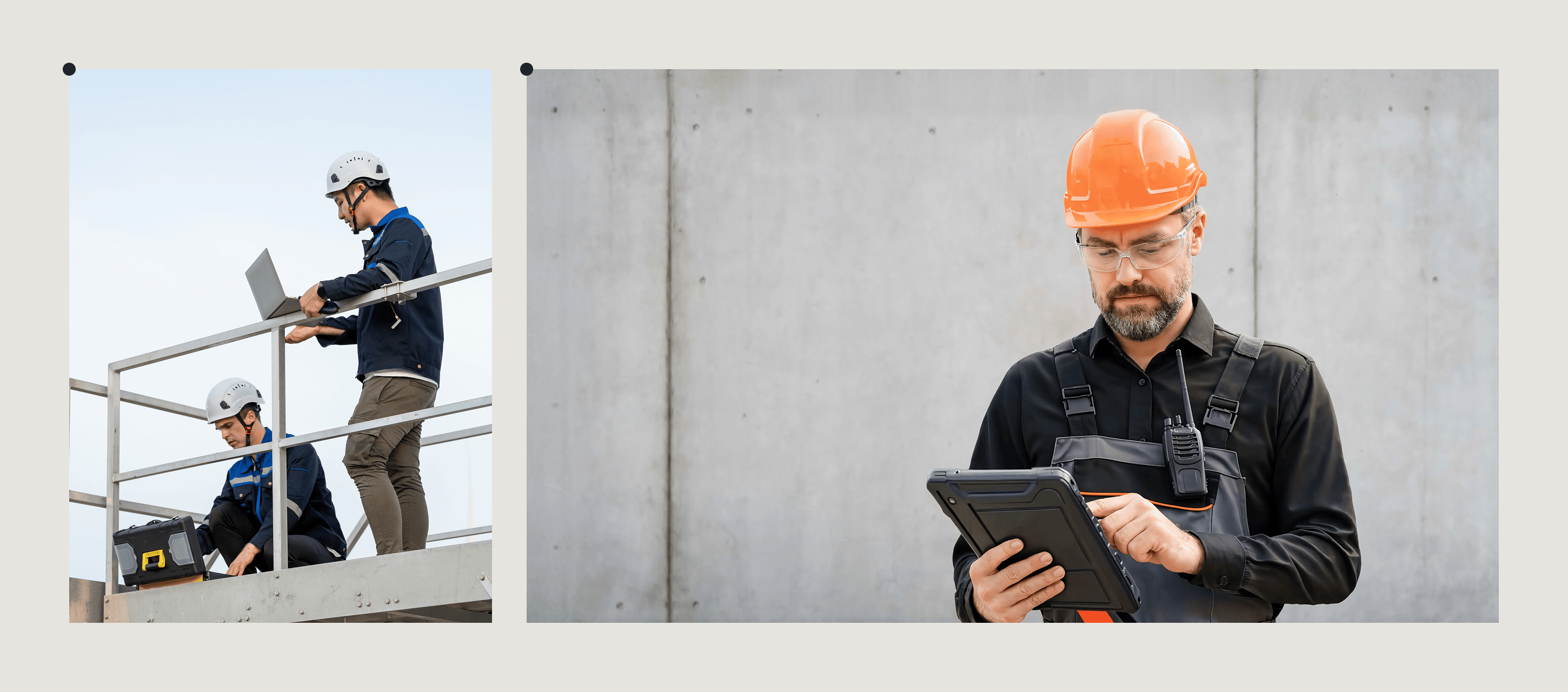
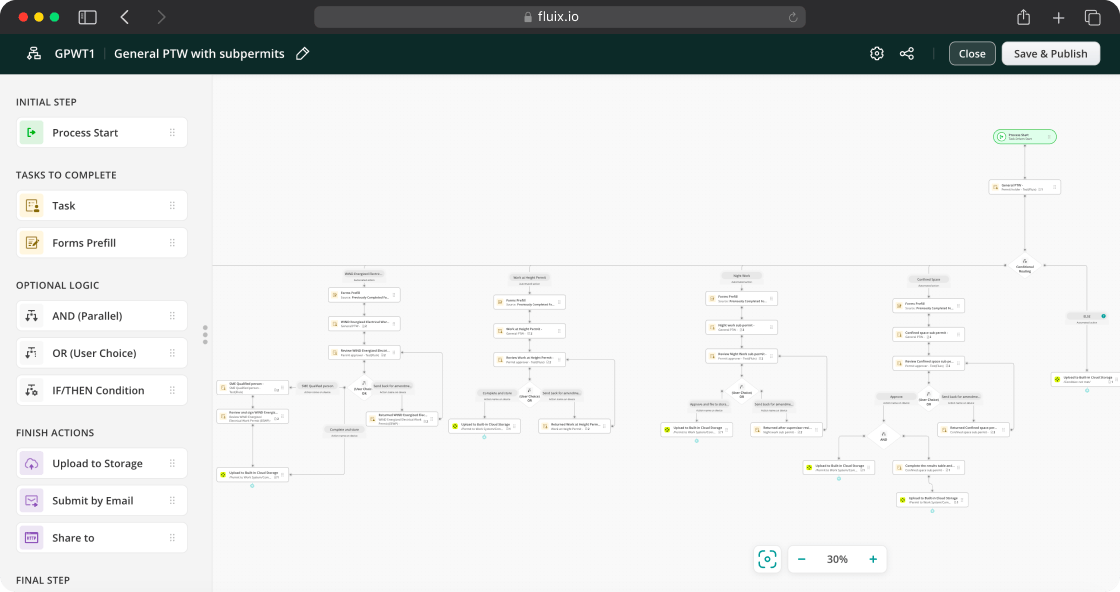
Fluix is built around what happens after the checklist. When a technician flags a finding, that finding automatically routes to a corrective action assigned to a named person with a due date — without anyone needing to create it manually. A senior engineer reviews the completed inspection and can push it back with notes before it closes. The inspection, the finding, the corrective action, the sign-off, and the archived record all flow through one connected workflow without manual intervention.
SafetyCulture Has the Deeper Template Library; Fluix Has the More Flexible Builders
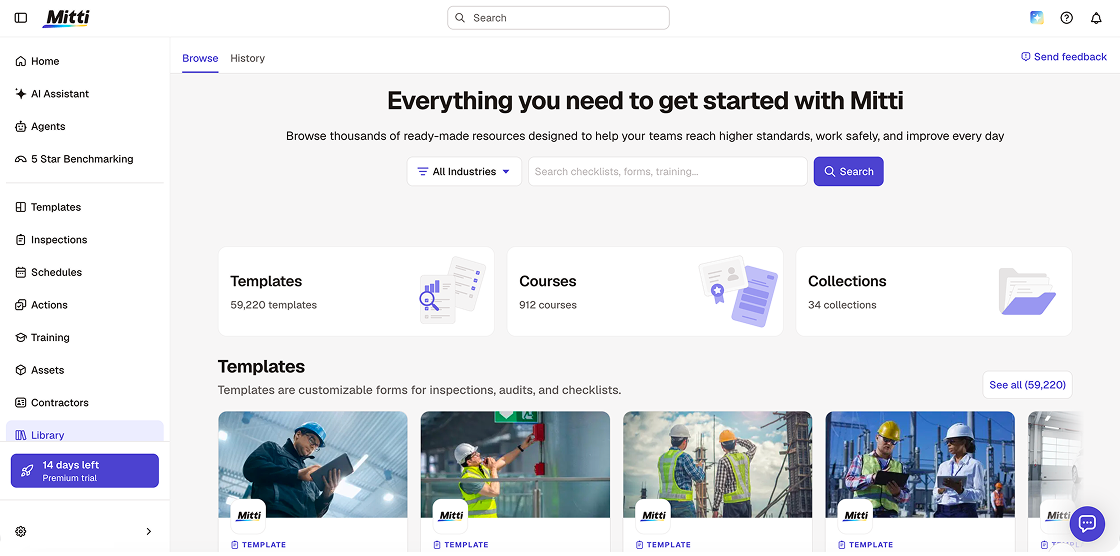
SafetyCulture’s template library is probably the best starting point on the market. Over 59,000 customisable templates cover construction site safety, vehicle pre-trip checks, hospitality hygiene, and hundreds of other use cases. The AI template generator can produce a 20-point checklist from a prompt in about ten seconds.
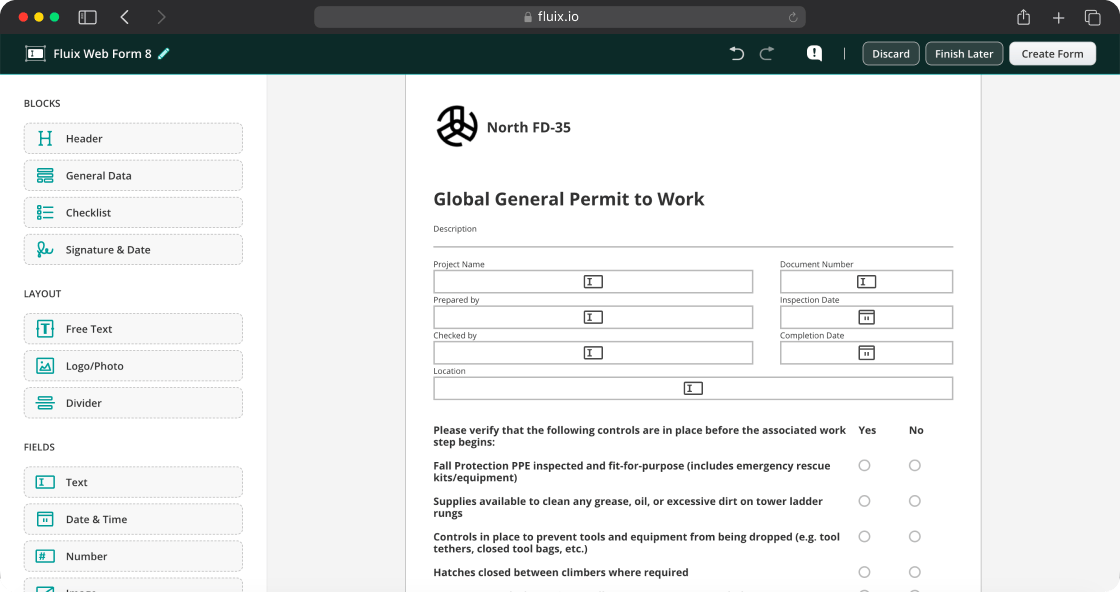
Fluix’s template library is smaller but the form builder is more capable for complex inspections.
Fluix supports both fillable PDFs and digital forms, meaning you can upload your existing PDF library or create new forms from scratch. The first option is suitable for big teams that typically have numerous forms: recreating them in the digital format all at once takes much time and human recourses. Dynamic digital forms fit small teams that don’t have IT teams and need a fast form builder.
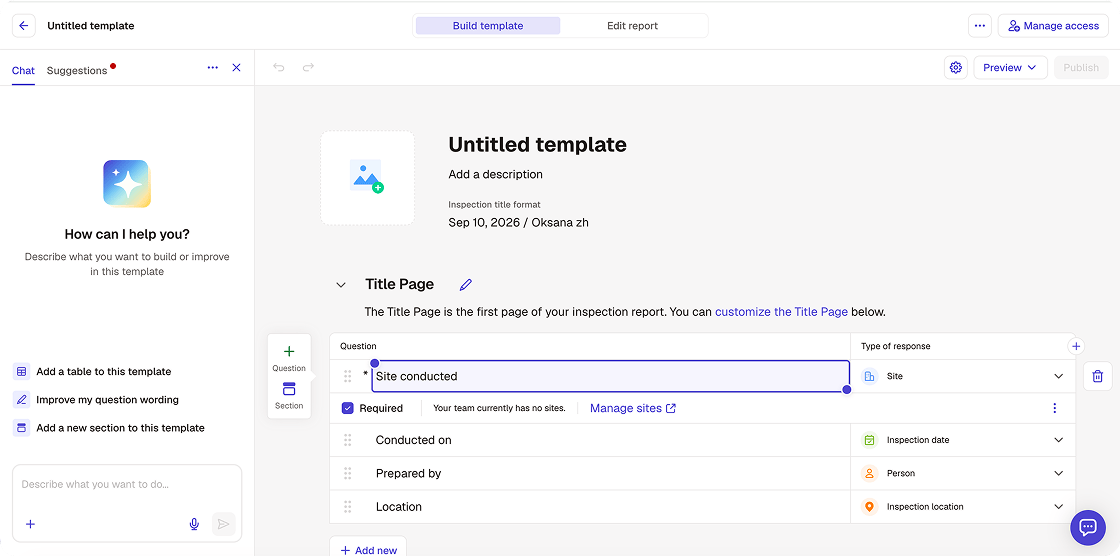
Forms in Fluix include calculation fields and logic: automatic risk scoring based on findings, fields that multiply to produce a compliance percentage, form sections that unlock only when certain criteria are met.
And using AI form creation, you can build a custom form in less than a minute.
For teams starting from scratch who want to be running fast, Mitti wins on template depth. For teams with complex form requirements or existing regulated document formats, Fluix’s builder is more capable.
Fluix Wins on Offline; Mitti Has Documented Sync Issues
Both platforms offer offline mode. However, Fluix’s offline capability was built for teams that work without connectivity as a baseline. Full inspections, photo capture with GPS timestamps, e-signatures, and barcode scanning all work without signal and sync automatically when connectivity returns. This is tested in environments where mobile connectivity is consistently unavailable — offshore wind turbine nacelles, partially-built structures, underground utility sites, aircraft hangars with metal shielding.
“The fact that you can use Fluix offline is an absolute must for us. It means that technicians can work on a boat, from their car, or from the top of a turbine.” James Bird, Maintenance Engineer, RWE Renewables
Mitti’s offline mode works in standard conditions. Multiple G2 and Capterra reviews document photo sync failures when teams reconnect after extended offline periods. For teams in offices or on well-connected sites, this is rarely a problem. For teams in remote field environments where connectivity is unreliable, it is a real risk.
If the honest answer to “will your team have signal during inspections?” is “sometimes no,” test offline mode specifically during any Mitti trial before committing. Put the app in airplane mode, complete a full inspection with photos, reconnect, and confirm the data is clean.
SafetyCulture Wins on AI Breadth; Fluix Wins on MCP
In August 2026, alongside the rebrand to Mitti, SafetyCulture launched a significant AI suite. AI Agents monitor site activity and run routine tasks in the background automatically. The AI Assistant surfaces patterns across inspection data and compares against safety standards.
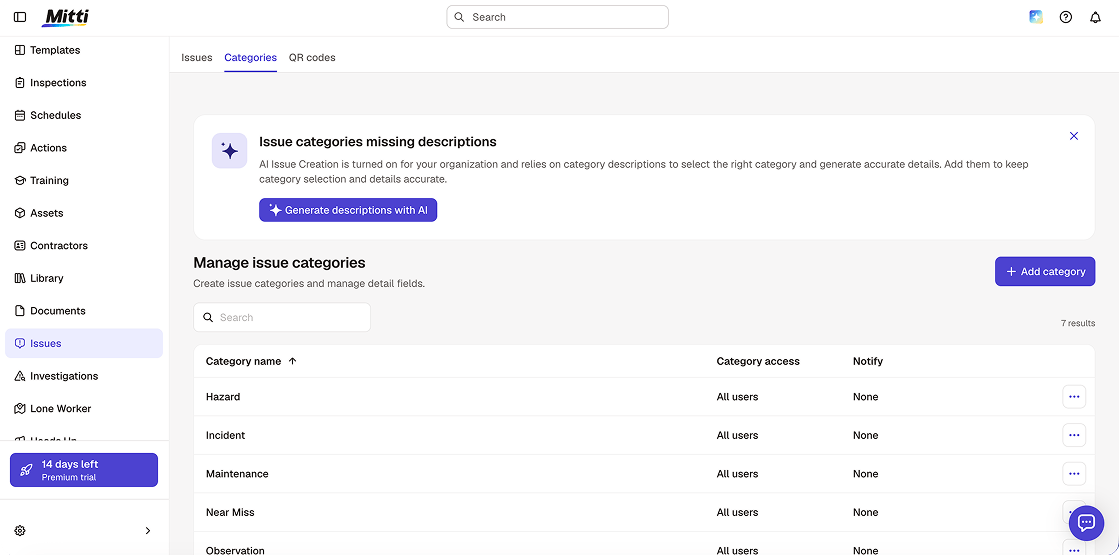
AI Issue Creation converts photos, videos, and voice recordings into structured issues without manual entry. 5-Star Benchmarking scores each site in a portfolio, giving multi-site managers visibility into which locations are performing and which are falling behind.
These are genuinely useful additions — particularly 5-Star Benchmarking for operators managing 20+ sites. G2 reviewers since the launch describe the AI capabilities as “early-stage” and note that “more AI features should be integrated for conditional logic and low-code customisation,” but the direction is clear: Mitti is investing heavily in AI as a differentiator.
Fluix’s AI approach is different — narrower in scope, closer to the inspection workflow itself. AI Form Creation builds inspection forms from a plain-language prompt or PDF upload in seconds. But the more distinctive AI capability Fluix launched in 2026 is the MCP connector.
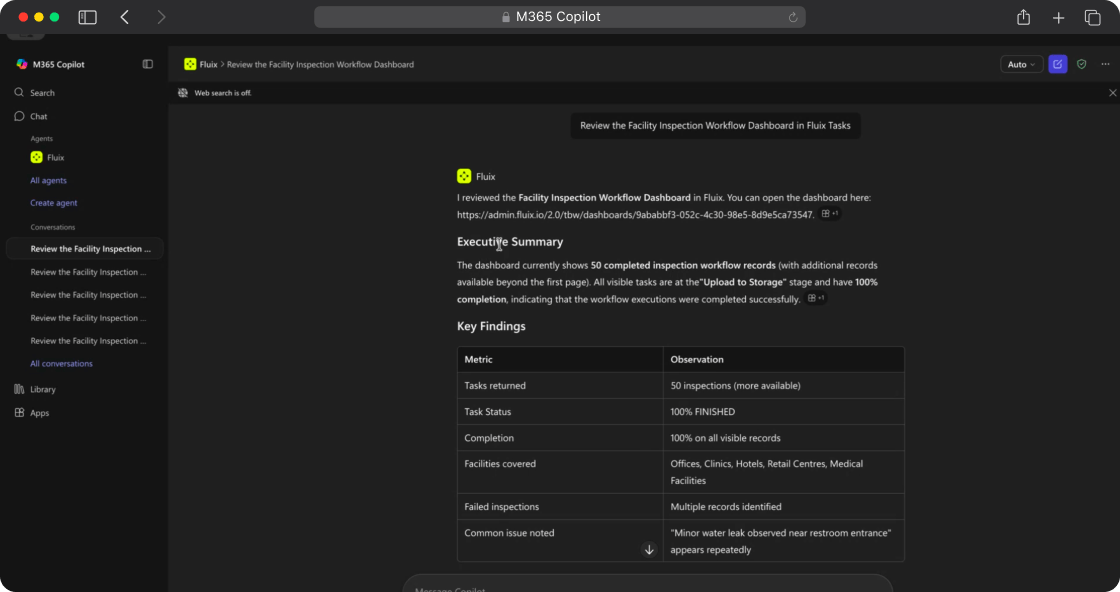
The Fluix MCP connector works with three AI assistants: Claude, Microsoft Copilot and ChatGPT. All three deliver the same capability: natural-language querying of live Fluix inspection data without building a report or opening a dashboard.
Instead of filtering a view or exporting to Power BI, an operations manager connects their preferred AI assistant to Fluix once and can ask questions directly. Example prompts Fluix documents: “Which sites have open corrective actions older than 14 days?” “Show inspection completion rates by crew for Q2″”Show me inspection completion rates by site”
SafetyCulture Starts Faster; Fluix Scales Better
The fastest path to running inspections is Mitti. Pick a template, customise it, assign it, run it. A non-technical team can be conducting safety walkthroughs the same day they sign up. The free plan for up to 10 users is functional — five active templates, core inspections, three years data history. For small teams with limited IT support and no complicated compliance requirements, this is a meaningful advantage.
Fluix deploys teams in about two weeks, depending on the size. Every customer gets a dedicated Customer Success Manager and Solutions Architect. The onboarding includes template migration, integration setup, and team training. Two weeks is faster than most enterprise software by a significant margin — but it is not same-day.
What changes at scale: Mitti’s per-user cost compounds as teams grow. A 20-person team on Mitti’s Premium plan pays approximately $5,760 per year — before adding external contractors. Multiple G2 reviewers with teams of 30+ flag the pricing as the primary reason for switching. Fluix’s Operations plan at $49/user/month includes guest access for external contractors, dynamic pre-filled forms, and multi-step approvals — the features that matter for a larger operation — without a per-seat charge for external users.
Pricing Compared
| Plan | Fluix | SafetyCulture (Mitti) |
| Entry | – Free trial is available – Crews: $29/user/month, 5+ users | – Free: up to 10 users, 5 active template – Lite Seat: $5/user/month — approximately 12 inspections per year, view-only |
| Mid | Operations: $49/user/month, 15+ users — includes guest access, multi-step approvals, issue reporting | Premium: $24/user/month (annual) / $29/user/month (monthly) — unlimited templates, AI features, SSO |
| Enterprise | Custom, 25+ users | Custom, 24/7 priority support, 99.9% uptime SLA |
| External contractors | Included in Operations plan — no extra charge | Per-seat: Lite Seat at $5/user/month |
The practical pricing difference: for a team of 20 full users plus 10 external contractors, Fluix’s Operations plan charges only for the 20 full users. Mitti charges for all 30 on Premium — or requires Lite Seats at $5/month each for the 10 contractors, adding $600/year.
Integrations
Both platforms integrate with the tools field operations teams use. The key integrations for the Fluix and Mitti buyer:
Fluix: Procore, Power BI, Salesforce, HubSpot, Zapier, Airtable, Claude, Copilot, ChatGPT. API available on Enterprise.
Mitti (SafetyCulture): Power BI, Power Automate, SharePoint, Salesforce, Procore, Simpro, Deputy, Geotab, Samsara, Zapier, Workato. Integrations marketplace at integrations.mitti.com. Integrations available on Premium and Enterprise only — free plan has no integration access.
For teams already using Procore on construction projects, both integrate. For teams feeding inspection data into Power BI dashboards, both integrate. For teams using SAP, Fluix connects via API on Enterprise.
Fluix vs SafetyCulture: Which Inspection Tool Is Right for Your Team
Who Should Choose Fluix
Choose Fluix if:
- Your team works in remote or low-connectivity environments where offline reliability is a hard requirement — offshore, underground, at height, or in metal-framed facilities
- Your inspections require multi-step sign-off before a finding can be closed
- You need to use your existing PDF documents or regulated inspection formats
- External contractors need one-time access to specific inspections and you don’t need a full per-seat charge for each one
- You are in wind energy, construction, aviation, or utilities and want a platform with named customer outcomes in your specific industry
Customer evidence:
- CPP Australia: 43% faster wind farm inspections · 1,400+ labour hours saved
- RWE Renewables: 45% reduction in daily form completion time
- Dyna Crane: $286,650 saved annually · 3,185 labour hours reclaimed
- ZITON: 72% reduction in inspection checklist completion time
- Drax Power: 5+ hours per worker per day saved
Who Should Choose SafetyCulture (Mitti)
Choose Mitti if:
- You need to deploy inspections fast across a non-technical workforce without IT support — the template library are unmatched
- Your team is in hospitality, food and beverage, retail, or healthcare where the template library already covers your inspection types
- You want the most advanced AI features available in the inspection management category in 2026
- You manage 20+ sites and need portfolio-level performance benchmarking out of the box
- You have a small team (under 10) and the free plan is a viable starting point
Customer evidence:
“The team walks through checklists on mobile, takes photos, and submits safety reports in minutes – it’s changed how we work.”Operations Manager, Electrical Contracting (G2)
“Our team is motivated to use it because it’s easy, and they’re seeing the benefits of doing so.” Graham Berry, Group General Manager HSEQ Assurance, Thermosash Group
“Fast, responsive, and very easy to train new people on.” Field Safety Lead, Logistics Company (Capterra)
Support and Learning Resources
Fluix
Every Fluix customer gets a dedicated Customer Success Manager and Solutions Architect from day one, regardless of plan. The onboarding process is structured: template migration, integration setup, and team training are all included. Most teams are live within two weeks.
Ongoing support is available via email and live chat. Enterprise plan customers get premium support with faster response times. Fluix also provides:
- Help Centre with step-by-step articles covering every feature
- Onboarding webinars and product training sessions
- Video tutorials for mobile and web platform
- A library of ready-to-use inspection templates to reduce setup time
- Field Intelligence podcast and Fluix Experts video series for deeper product knowledge
One thing Fluix does not yet have at the scale of Mitti: a large community forum or peer network where users share templates and discuss best practices.
Ratings for support specifically:
- Customer service: 4.8 — Capterra
- Quality of support: 4.8 — G2
SafetyCulture (Mitti)
Mitti’s support model scales by plan. The free plan includes access to the help centre and community. Premium includes standard support. Enterprise includes 24/7 priority support with a 99.9% uptime SLA.
Where Mitti’s learning resources stand out is depth and community. The platform has been around since 2012 and has invested heavily in self-serve education:
- Help Centre with thousands of articles covering every configuration option
- SafetyCulture Academy — structured online courses for administrators and users
- 1,000+ training courses available directly inside the platform via the training module
- Community forum where users share templates, ask questions, and exchange best practices
- Webinars and live Q&A sessions for new feature releases
- YouTube channel with product walkthroughs and use-case tutorials
Ratings for support specifically:
- Customer service: 4.5 — Capterra
- Quality of support: 4.4 — G2
FAQ
- Is SafetyCulture still available in 2026?
SafetyCulture rebranded to Mitti in August 2026. The product, pricing, and team are unchanged. The mobile app is now called Mitti and the website is at mitti.com. If you are currently using SafetyCulture, nothing changes — data, templates, and workflows migrated automatically.
- Can Fluix replace SafetyCulture for construction inspections?
Yes. Fluix is used by construction companies including Dyna Crane and Centuri for safety walkthroughs, equipment inspections, quality audits, and corrective action tracking. The Fluix vs SafetyCulture decision for construction teams typically comes down to whether multi-step approval workflows and regulated document formats are required — if yes, Fluix. If the priority is fast deployment and a large template library, Mitti.
- Does Fluix work offline better than SafetyCulture?
Based on user reviews on G2 and Capterra: yes. Fluix is used by RWE Renewables for offshore wind turbine inspections specifically because of its offline reliability. Mitti’s offline mode works in standard conditions but has documented photo sync issues in reviews from teams working in extended low-connectivity environments.
- Is SafetyCulture (Mitti) cheaper than Fluix?
For small teams, Mitti is cheaper — the free plan for up to 10 users is the most functional free tier in the category. For teams over 15 users, the pricing is comparable. For teams with external contractors, Fluix’s included guest access on the Operations plan frequently makes it the more cost-effective option.
- How long does it take to switch from SafetyCulture to Fluix?
Most Fluix deployments are live within two weeks including template migration, integrations, and team training. Fluix provides a dedicated Customer Success Manager, Solutions Architect, and Support Team throughout.
- What industries use Fluix instead of SafetyCulture?
Wind energy, offshore oil and gas, aviation maintenance, heavy construction, and utilities. These industries share common requirements — reliable offline capability, multi-step approval workflows, and regulated document formats — that Fluix addresses more directly than Mitti.