SafetyCulture – now Mitti – is one of the most recognizable safety apps on the market. It helps teams manage safety tasks, and deliver training across field operations. So how well does it actually perform in real-world field realities?
This is my honest evaluation based on hands-on testing of the 2026 version, plus analysis of real user feedback on G2, Capterra, and other review platforms.
Note: SafetyCulture rebranded to Mitti in August, 2026. The platform is now at mitti.com, the mobile app is called Mitti, and all data, logins, and workflows were migrated automatically. Throughout this review I use “SafetyCulture” where for your search convenience, and “Mitti” when referring to the current product state. All the data, including pricing, features and product images are up to date.
Executive Summary
Mitti (formerly SafetyCulture) is best for teams that want fast digital inspections, a massive template library, and a polished mobile experience. It does a good job of turning paper checklists into structured, trackable forms.
Where it falls short? Multi-step approval chains and task routing, deep document control, and highly customized reporting layouts.
| Pros | Cons |
| Beautiful, intuitive mobile app | Per-user pricing scales quickly for large teams |
| AI-powered template and course generation | Report layout customization is limited |
| Massive public template library (100,000+) | Task workflows are mostly one-directional |
| Analytics with heatmaps and dashboards | Limited advanced approval routing |
Table of Contents:
- Executive Summary
- My Review Methodology
- SafetyCulture Features
- Onboarding
- Web Dashboard
- Mobile Application
- Inspection: Templates
AI Template Generation: New for 2026
Customization: Logic vs. Layout
Public Library
Inspection: Scheduling
- Tasks Management
- Automated Filing
- Document Integrity & Sacred Forms
Issue Tracking
- Training
- Security
- Analytics
- SafetyCulture Pricing
- SafetyCulture Integrations
- Real User Feedback
Pros
Cons
Who Is SafetyCulture Best For?
- Why I Believe You Should Consider Fluix
Inspection Management: SafetyCulture vs Fluix
My Review Methodology
I tested both the SafetyCulture web dashboard and mobile application, and my aim was to specifically evaluate:
- Onboarding flow
- Template creation (manual + AI)
- Scheduling and recurring inspections
- Task management
- Issue reporting
- Training builder
- Analytics dashboards
- Security and permissions
In parallel, I analyzed real user feedback from platforms like G2 and Capterra to identify recurring themes, (both positive and negative).
At the end of the piece you’ll see me comparing SafetyCulture (Mitti) on pricing, business needs and, finally, head to head with Fluix. Because a direct comparison always helps clarify where a tool excels, and where it may fall short.
The Mitti Rebrand — What Changed and What Did Not
What changed: the name, the app icon, and the website. SafetyCulture is now Mitti. The mobile app was renamed to Mitti. The website moved to mitti.com. The integrations marketplace moved to integrations.mitti.com.
What did not change: pricing, features, data, logins, workflows, templates, and integrations. Every existing customer was migrated automatically.
Why the rebrand: according to CEO Luke Anear, the company’s customers have been using the platform for far more than safety for years — capturing quality issues, maintenance faults, training gaps, and risk signals. The Mitti name reflects the platform’s current scope as a full operations system, not just a safety and inspection tool. The strategic expansion also includes Mitti Insurance, now licensed across the United States, which Anear expects will eventually represent at least 30% of the business.
What this means for buyers evaluating the product: the platform is actively expanding beyond inspections. For teams who need a focused inspection management tool, this broader scope adds complexity, more features to navigate, more modules that may not be relevant to your use case, and a product roadmap oriented toward enterprise operations rather than inspection depth.
Mitty by SafetyCulture Features
Onboarding
Technically not a feature, but onboarding is a very important part of any tool adoption. And I find it interesting that Mitti personalizes your onboarding experience straight away, by asking which industry you operate in.
The setup process is short – just three questions – and immediately after registration, you’re guided straight to the template library.
The template library definitely stands out. You can instantly see how many times a template has been downloaded and whether it has been verified by a reputable body. This gives me, as a user, confidence knowing that the template was created by someone with real experience in my industry.
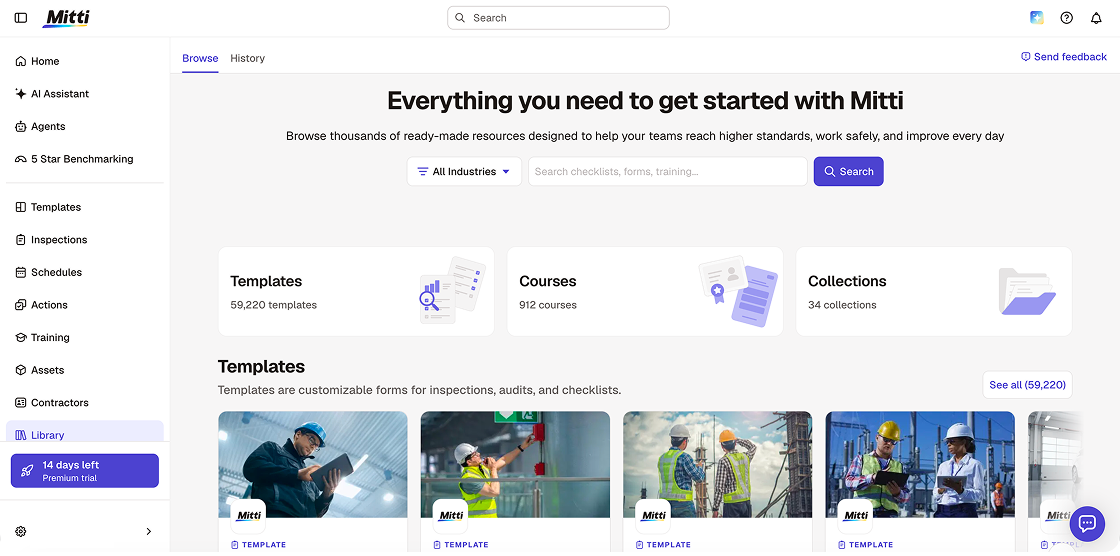
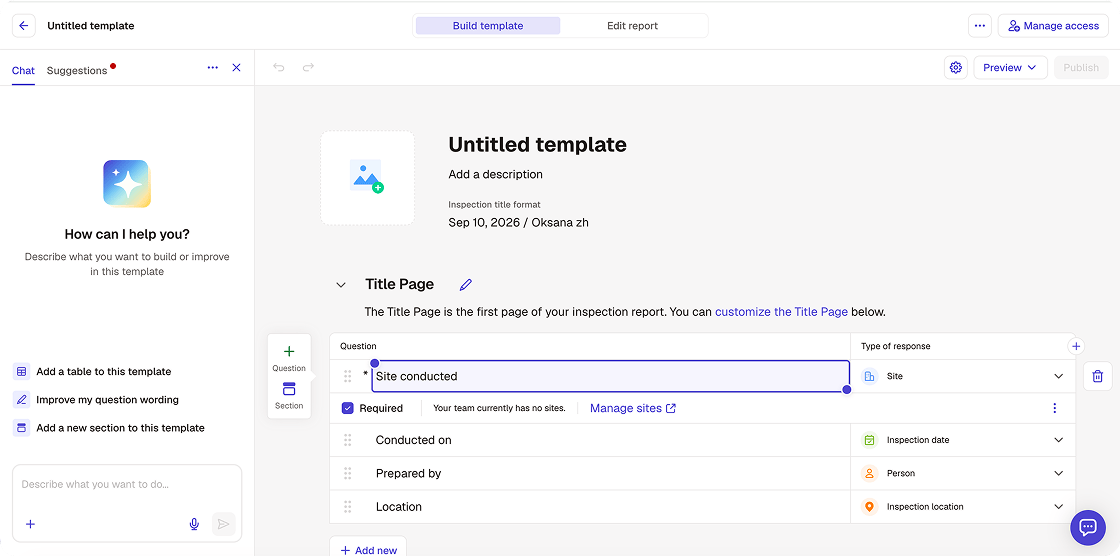
You can choose t0 create a blank template, and then you’ll be guided through each step and offered AI assistance.
Web Dashboard
I also want to touch on the user experience before diving deeper into specific features.
My initial impression of the Mitti interface is that they’ve doubled down on being the Apple of safety apps. The design is lovely, but having reviewed dozens of these tools, I’ve noticed that an emphasis on beauty sometimes also creates clutter, which can impact feature use.
The web dashboard is a bit of a mixed bag for admins. It’s where Mitti properly gets down to business but it’s also a little overwhelming.
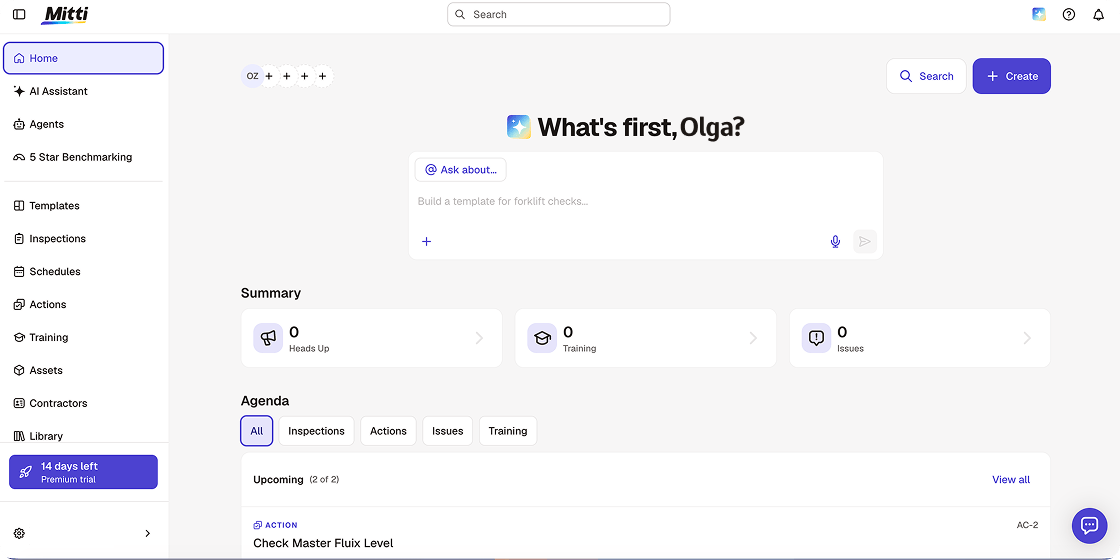
- ‘App Sprawl’: Because Mitti incorporates so many functions (Training, Assets, Sensors, even Insurance) the side menu system is overlong. If you only use Mitti for Inspections, seeing buttons for ‘Asset Lifecycle’ or ‘Sensor Telemetry’ can feel like noise
- Template Builder: I appreciate the drag-and-drop, however setting up ‘Logic’ (e.g., if they say ‘Yes’, ask this; if they say ‘No’, demand a photo) still feels a bit like a puzzle. It’s powerful, but you’ll want a decent amount of time to set it up properly
- Powerful Analytics: One major positive, however, is how Mitti visualizes data. Most platforms just give you a spreadsheet. It gives you a Heatmap. For example, I could see at a glance that ‘Site B’ has failed 40% of their ladder checks this week. It turns data into a story, which is great for meetings
Mobile Application
The mobile app is where the magic happens. If you’re a worker on a construction site or in a warehouse, the Mitti app is super simple. It feels less like a work tool and more like a social app you’d actually want to use.
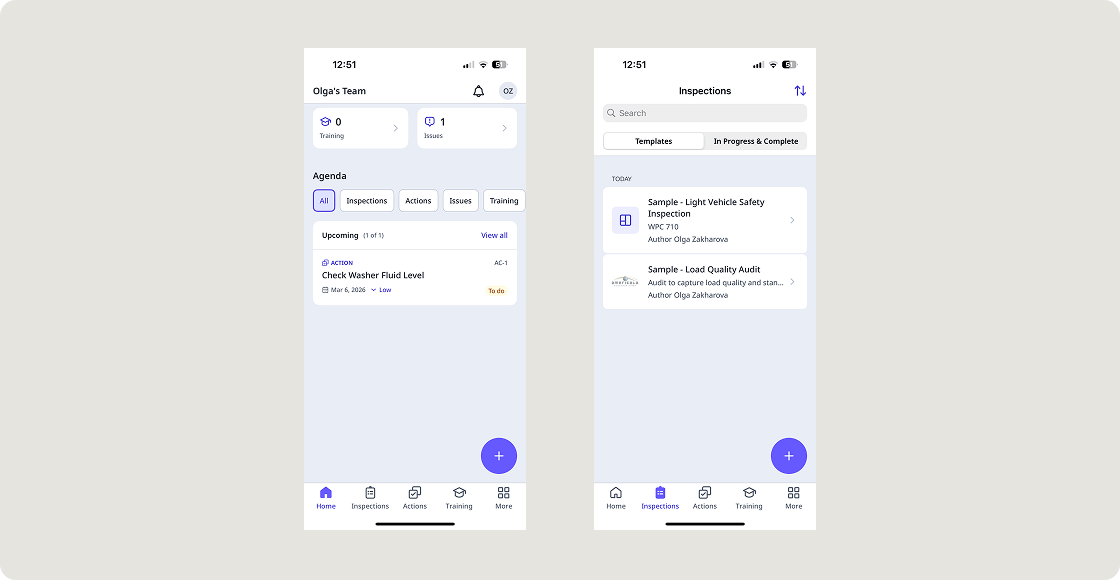
- ‘Big Button’ Vibe: When you open the app, you aren’t hunting for menus. The main actions, Start Inspection or Report an Issue are right there. It’s built for thumb-navigation, meaning you can basically run a whole audit with one hand while holding a coffee in the other
- Photo Reporting: This is best in class. I love how the camera is integrated. You snap a photo, circle the hazard with your finger, and it’s done. It feels as fast as sending a WhatsApp message
- Heads Up Feed: Instead of boring emails, managers can send video updates that look like Instagram Stories. As a user, I just watch the 30-second clip, hit ‘Got It’, and I’m back to work. It’s the most painless way I’ve seen to handle company-wide safety alerts
Another bonus is that if you don’t have access to a laptop, the app has you covered. Inspections, creating a course, tracking actions, informing managers about an incident etc. Anything you can create on the desktop version, you can do on your phone.
Inspection: Templates
These are clearly the core of the Mitti ecosystem built upon its iAuditor foundations. If you’ve ever tried to build a form in a basic spreadsheet or a clunky old EHS system, using Mitti feels like switching from chalk and slate to a high-end laptop.
It’s incredibly fast but having put it through its paces, I do have a few ‘reviewer gripes’ that you really only notice once you’re deep in the settings.
AI Template Generation: New for 2026
Mitti currently leads in this space. In the past, you had to manually type out 50 questions for a ‘Forklift Safety Check’. Now, you can just use the AI Prompt.
I typed “Create a daily check for a commercial kitchen including food temp and fire exits.” In about 10 seconds, it generated a 20-point checklist that included things I hadn’t even thought of, like “Checking the expiration dates on the first-aid kit”.
This is a massive time-saver for managers who aren’t compliance experts. And yet, it can be a little generic. You still have to go in and tweak the wording to make it fit your specific site’s terminology or jargon.
Customization: Logic vs. Layout
This is where I have a bit of a love-hate relationship with the Mitti platform.
- Love – Conditional Logic: SafetyCulture is great at ‘if-this-then-that’ conditional logic. If a worker clicks ‘Failed’ on a fire extinguisher check, the app instantly generates a camera window and a mandatory field to assign a repair task. It keeps the form clean because you only see the questions that matter
- Hate – Report Layout: While building the form is easy, customizing the final PDF Report is still surprisingly rigid. In 2026, I find myself wishing I could drag the Summary box to the bottom or change the font size easily. It always looks like a Mitti Report, which might not be what you want if you’re sending it to a high-end client
Public Library
Special mention should also go to Mitti’s Public Library, which is a goldmine of over 100,000 templates. If you’re looking for a specialized audit for Aviation or Mining, it’s probably already there, built by an expert.
Inspection: Scheduling
For me, Mitti’s ‘Schedules’ experience is all about automation. It’s designed for the manager who has, let’s say, 50 sites and doesn’t want to manually assign 50 inspections every Monday morning.
- Advanced Recurrence: You can get very granular here. For instance, need a check every 5 minutes for a high-risk pressure gauge, or a seasonal check that only runs from June to August? You can set those rules once and the app generates the tasks automatically
- Bulk Site Management: This is a huge win for large companies. You can create one ‘Master Schedule’ and push it to every location. If you need to change the inspection time, you change it once and it updates across all of your sites instantly
- ‘Assignee Logic’: I love the flexibility here. You can set it to “Only one needs to complete” (so the first person to the site does the check) or “All must complete” (meaning every individual on shift must sign off)
- Smart Time Zones: SafetyCulture finally handles global teams correctly. You can lock a schedule to a specific site’s time zone, so your team in London and your team in New York both see ‘8am’ in their local time
Need inspections that go beyond checklists?
Fluix is built to automate approvals, routing, and document control for field teams.
Tasks Management
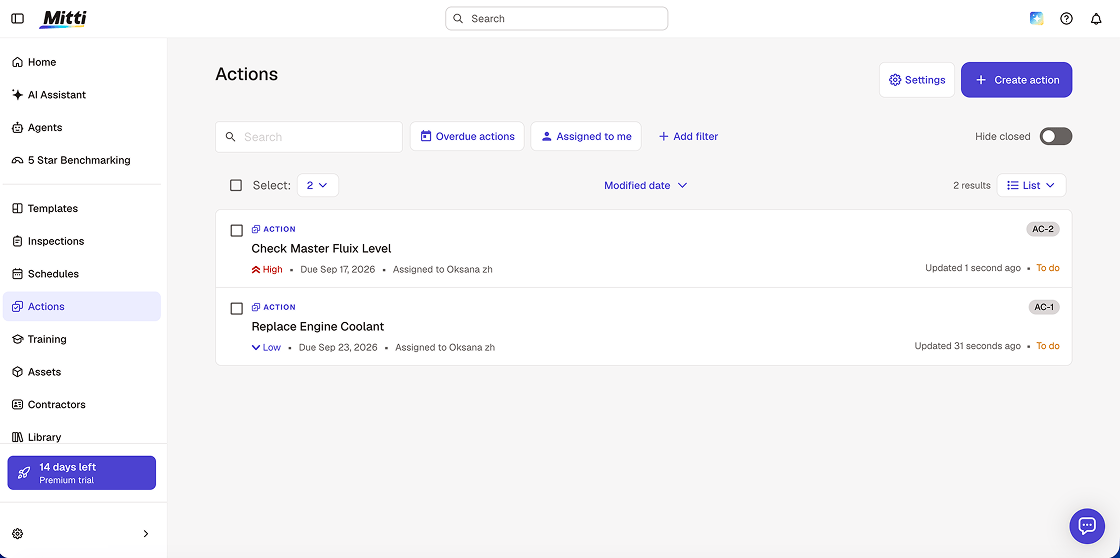
Mitti’s task management is almost entirely event-driven. What I mean by this is that the platform really shines when a task is created out of a failed inspection item. For example:
- Instant Action Creation: If a worker marks a fire exit as blocked during an audit, a UI immediately prompts them to ‘Create an Action’. The system attaches a photo of the blockage and the location data, so the person assigned to fix it doesn’t have to wonder which door is blocked. Super useful!
- Evidence-Based Completion: You can require evidence for a task to be marked as done. The person fixing the issue has to upload a photo or a signature to prove the work was completed. It’s the kind of functionality that’s invaluable for preserving and strengthening the audit trail
- Priority and Labels: You can set ‘Critical’, ‘High’, or Low’ priorities which definitely aids scheduling and productivity. The 2026 update also allows for custom labels, so you can tag tasks as ‘Maintenance’, ‘Urgent Repair’, or ‘Safety Hazard’ for better filtering later
Automated Filing
This feature is where Mtti users often get frustrated, which suggests an area that hasn’t moved on too far from the iAuditor days.
Once a task is done in Mitti, the data just sits in their cloud. You have to manually download it or use a complex integration to move it.
For context, with Fluix you can set a rule that says: “When this task is finished, name the file ‘Repair_SiteA_Date’ and automatically save it in our company’s Google Drive ‘Completed’ folder.” Your files are exactly where they should be, named exactly how you want them, without a human ever touching them.
For Mitti to also remove this administrative phase would be a big bonus.
Document Integrity & Sacred Forms
Mitti forced my tasks into its own app-style layout. This is fine for a quick fix, but if you’re in Aviation, Wind Energy, or Engineering, you likely have ‘sacred’ PDF documents that are legally required to look a certain way.
Again, for context, Fluix allows you to use your exact original PDFs as the task interface, supporting advanced annotations, complex calculations within the form, and legally binding e-signatures.
Issue Tracking
This feature lets your team report field data outside of inspection forms, such as hazards, incidents, property damage or near misses. You can create new categories to suit your business needs and also modify the issue.
You get issue fields that you can capture when an issue is initially reported. You can also add questions. But I feel this is somewhat of a basic function, especially when we consider field teams operating in difficult environments.
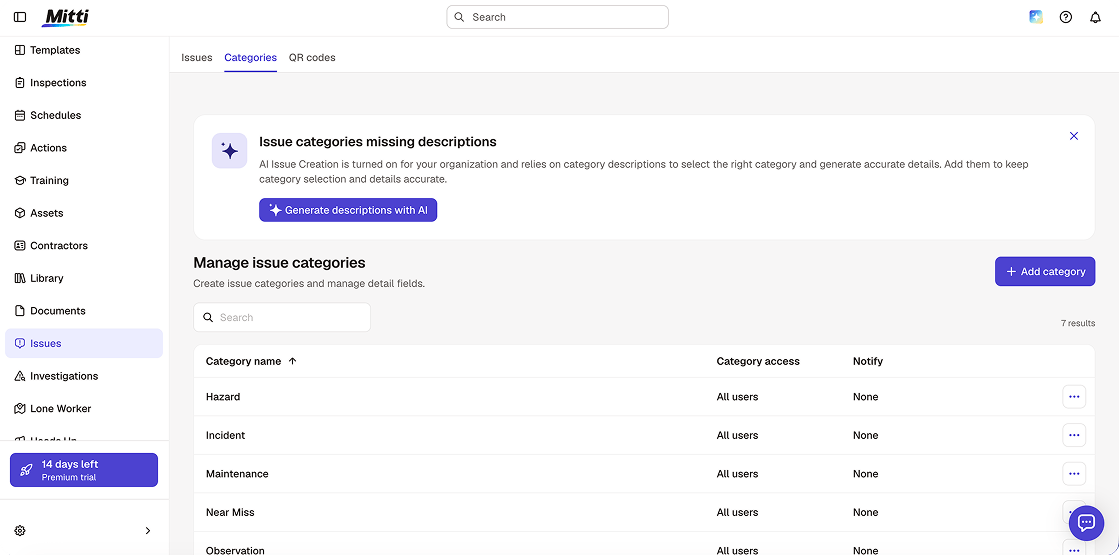
What would lift this feature considerably is if issues were treated more like a concrete process, not a ‘conversation’. By this I mean the reporting of an issue would trigger a pre-designed workflow with set processes in place that ensure proper steps, in line with regulatory requirements, were taken every time.
Training
The Mitti by SafetyCulture platform’s Training feature is impressive. It consists of 896 customizable courses that are tailored to different industries. What makes it even more powerful is that you can see how each course will look on different devices and customize them accordingly. It makes for a very user-friendly experience, which is crucial in a training context.
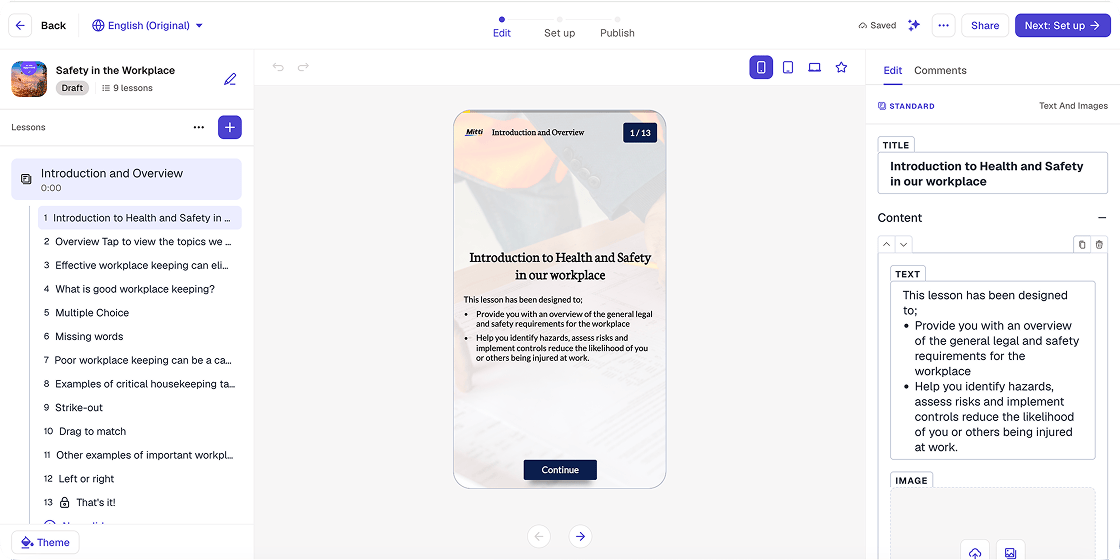
- ‘Bite-Sized’ Everything: The SafetyCulture Training ethos is 5-minute lessons. Workers get push notifications for micro lessons they can finish during a coffee break. It feels more like Duolingo than a lecture or seminar
- AI Course Creator: Much like the template builder, you can type a prompt like “Create a 4-slide course on ladder safety in rain”. AI generates the slides, the quiz questions, and even adds relevant images. It’s a 10/10 for speed
- Closed-Loop Learning: This is the killer feature. If a site consistently fails a specific inspection item (e.g. PPE compliance), the system can automatically trigger a training course for that specific team. It’s training that responds to real-world failures
Security
The Mitti security suite was designed for zero-trust environments and it’s clear, with the shift to the SafetyCulture brand, this is one area that is still of the highest priority.
- World-Class Compliance: The ‘Big Three’ of safety and data security are covered here: ISO 27001, SOC 2 Type II, and GDPR compliance. In 2026, Mitti also touts 99.9% uptime SLAs for enterprise clients
- Single Sign-On (SSO): This is a must-have for big teams. You can link Mitti to your company’s existing login (Okta, Microsoft Entra ID, etc.), so when an employee leaves the company, their access to your safety data is instantly removed
- Role-Based Access Control (RBAC): This is very granular. You can make it so that a site lead can see reports for their warehouse, but the frontline worker can only see their assigned tasks
- Immutable Audit Trails: Every time a report is edited, Mitti logs who did it and when. You can’t delete mistakes to hide them from an auditor. History is baked into the data
Analytics
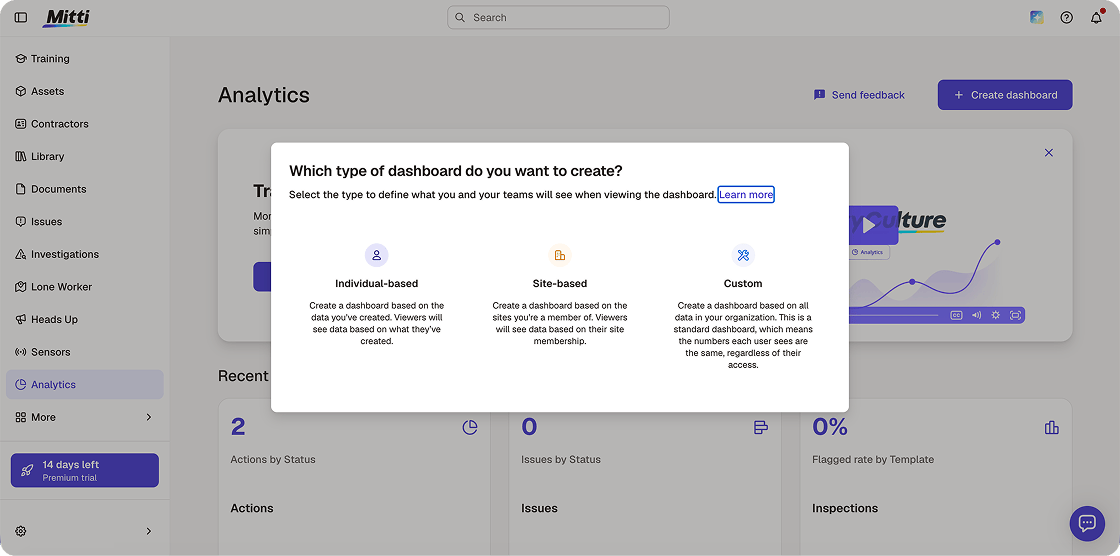
The interesting thing about Mitti analytics is that the first thing you have to choose is what type of dashboard you want: Individual-based, Site-based or Custom.
This ability to create detailed custom dashboards is not just user-friendly but ideal for organizations of all shapes, sizes and needs.
In addition, Mitti provides a dashboard template with charts in place and you simply pick the data you want made viewable. You can focus on feature-specific dashboards for Inspections, Actions, Site, Issues and Assets.
This creation and navigation of charts is really straightforward and incredibly valuable when it comes to reviewing productivity and issues, and forecasting performance.
Read More: If you’re weighing your options, I’ve also reviewed the best SafetyCulture alternatives for field teams in 2026.
New AI features
Alongside the rebrand, Mitti launched a significant suite of AI capabilities. These are the most substantive product additions since I originally reviewed the platform.
AI Agents: background agents that monitor what is happening on site and run routine tasks automatically — without a manager needing to log in and action them. The practical version: if a particular inspection finding type appears three times in a week across a site, an agent can create a task, assign it, and notify the site manager automatically.
AI Assistant: surfaces patterns and risks across inspection data, compares performance against relevant standards and regulations, creates action plans, and answers questions in seconds. From the Mitti announcement: “Building a new checklist used to take three to four days. Now he simply describes what he needs, and AI Assistant does the rest” — quoted from the Trackhouse Racing team, who use Mitti for vehicle and equipment inspections.
5-Star Benchmarking: turns years of operational history into one clear score for multi-site operators. Each location is rated against a five-star standard, showing how it performs relative to the rest of the portfolio and what to focus on to improve. This is the clearest reporting addition for multi-site operations managers.
AI Issue Creation: turns photos, videos, and voice recordings into structured, categorised issues automatically — removing the manual data entry step from incident reporting in the field.
SafetyCulture Pricing
Mitti by SafetyCulture pricing is essentially a single paid tier for most businesses. It can feel restrictive for teams that want different access levels for different workers — and the per-seat model gets expensive as the team scales.
The Lite seat option helps with this. At $5/user/month, workers who only submit around 12 reports per year get access to team chats, task assignments, and view-only data without a full paid seat.
Pricing note on the annual vs monthly rate: the free plan does not require a credit card. The Premium plan is $24/seat/month billed annually or $29/seat/month billed monthly. Earlier versions of this article listed both figures without clearly differentiating them — $24 is the annual rate, $29 is the monthly rate.
| Plan | Price | Users | Key inclusions |
|---|---|---|---|
| Free | $0 | Up to 10 | Basic inspections · 5 active templates · 3 years data history · 300 AI credits/seat/mo |
| Premium | $24/seat/mo (annual) · $29/seat/mo (monthly) | Unlimited | Unlimited templates · AI summaries · Training tools · Advanced analytics · SSO · 500 AI credits/seat/mo |
| Lite Seat | $5/seat/mo | Add-on to Premium | ~12 inspections per year · View-only · Team chat · Task assignments |
| Enterprise | Custom | 25+ | 24/7 priority support · 99.9% uptime SLA · SCIM provisioning · 800 AI credits/seat/mo |
SafetyCulture Integrations
The integrations marketplace has moved to integrations.mitti.com. The platform now lists approximately 60+ integrations across categories including fleet management, HR, CRM, data analytics, cloud storage, and field service management.
Key integrations confirmed active in 2026:
- Cloud storage and document management: SharePoint (including automated export of completed inspection reports to SharePoint folders), Google Drive and Sheets, Dropbox
- Microsoft suite: Power BI, Power Automate, Excel, Microsoft Teams, Microsoft Outlook
- ERP and operations: SAP, Salesforce (two-way: trigger Mitti inspections from Salesforce jobs and feed results back automatically), Procore
- Workflow automation: Zapier, Workato (for custom workflows connecting Mitti to other applications without code)
- Field service: Simpro (two-way integration pushing Simpro job data into Mitti inspections), Deputy (using Mitti training data for compliance-based shift scheduling)
- Asset and fleet management: Geotab, Samsara (connecting asset names, IDs, and maintenance history)
- Reporting: Tableau, and various dashboard tools via API
Important note: integrations are only available on Premium and Enterprise plans. Free plan users cannot connect Mitti to external systems.
Real User Feedback
I think SafetyCulture (iAuditor) scores well across the major software review sites and app stores. The most recent review scores listed below (as of February 2026) take into account variables like Ease of Use, Customer Support, Value for Money and Functionality:
- G2: 4.6/5
- Capterra: 4.6/5 (Ease of Use and Customer Service)
- Software Advice: 4.6/5
- TrustRadius: 8.9/10
- GetApp: 4.6/5
- Apple App Store: 4.6/5
- Google Play: 4.5/5
Breaking down what people seem to like and don’t like in submitted reviews, there is general consistency across:
What users consistently praise
- Ease of use — the most mentioned positive across all platforms
- Template library depth and quality
- Mobile app design — specifically photo capture and thumb navigation
- Customer support responsiveness
- Affordability for small teams, and value on the free plan
What users consistently flag as limitations
- Per-seat pricing scales quickly: the single most common complaint from teams of 20+ users. Multiple reviewers note the cost becomes “significant” for larger teams.
- Advanced workflows, dashboards, and integrations are challenging to set up: G2 AI summary flags this as one of the two most consistent negatives.
- Limited customisation: report layouts cannot be customised to match client or regulatory formatting requirements.
- Scheduling complexity: one G2 reviewer notes it “takes a lot of time to create programs and the latest update is asking me to restart all work already done, with no option to migrate past information.”
- Upselling during support: one G2 reviewer specifically flags: “Customer service — they try to sell us more seats as opposed to helping us buy the right thing for us.”
- AI capabilities described as basic: G2 reviewers since the August 2026 AI launch note the AI features exist but feel early-stage, particularly around conditional logic and form customisation.
Who Is SafetyCulture Best For?
For me, the ‘sweet spot’ for SafetyCulture (Mitti) is organizations that have multiple locations, field teams operating in those locations, and regulatory obligations that need to be followed.
In terms of industries, Mitti has a broad reach:
- Construction – site safety audits, incident reporting, equipment checks and training
- Manufacturing – quality control inspections, ISO compliance, asset safety
- Hospitality – food safety audits, hygiene checks, managing internal controls
- Retail – store checklists, loss prevention, and compliance across branches
- Transportation – pre and post-trip vehicle inspections, fleet safety, driver compliance
- Healthcare – facility audits, infection control checks, equipment maintenance logs
- Mining & Resources – hazard identification, site management, regulatory compliance
- Facilities Management – maintenance inspections, cleaning audits, equipment logs
- Energy – field and asset inspections, permit-to-work, training
- Aviation – digital logbooks, pre-flight checks, ground operations safety
| Best For | Not Ideal For | |
| Size of organization | SMEs to Enterprise | Solo, small operators with minimal compliance requirements |
| Type of workplace | Field-based, mobile workforces requiring mobile access to data capture and submission | Desk-bound office staff |
| Business need | Safety audits, inspections, checklists, incident reporting | Deep project management or enterprise resource planning |
| Level of compliance | High-regulation industries needing comprehensive and secure audit trails and reporting | Low-regulation businesses with minimal compliance requirements |
| Data requirements | Photo capture, signatures, geocoding (on mobile, in the field) | Advanced data analytics or repositories |
| Field team structure | Multi-site organizations that need data and operational alignment | Single-location businesses with simple operations |
SafetyCulture vs Fluix: Head-to-Head Comparison
In 2026, the inspection management space has continued to shift. Mitti has positioned itself as a broad operations platform. Fluix has positioned itself specifically as inspection management software — built around the full inspection lifecycle from dispatch to final archiving.
Here is the direct comparison:
| Feature | Mitti (formerly SafetyCulture) | Fluix |
|---|---|---|
| Conditional logic | Simple: Pass / Fail / Action | Advanced: calculation fields and logic loops |
| Document style | Standardised app-form layout | Professional PDF — your exact company documents |
| Offline performance | Good but can lag with large photos; photo sync issues documented in reviews | Designed for remote, zero-signal environments — rock-solid offline |
| Approval chain | One-directional: single user closes the check | Multi-tier: requires review and sign-off before closing |
| Data flow | Stays in Mitti’s cloud until manually downloaded or integrated | Automatic filing to SharePoint, Google Drive, or your existing storage |
| Scheduling | Great for bulk reminders at scale | Resource allocation: assign by skill, location, or workload |
| AI features | AI Agents, AI Assistant, 5-Star Benchmarking (Aug 2026 — described as early-stage by reviewers) | AI form generation, Field Intelligence |
| Guest / external access | Per-seat, Lite Seat option at $5/user/mo | Guest access included on Operations plan — no full seat required |
| Platform scope | Broad operations platform — inspections, quality, maintenance, training, assets, insurance | Focused inspection management |
Scheduling: SafetyCulture’s scheduling is good for automated reminders. Fluix task scheduling is built for resource allocation — you can assign inspections based on a technician’s specific skill set, location, or current workload. The visual planner shows every inspection across the full month in a way that feels like mission control rather than a calendar.
Document integrity: Mitti forces tasks into its own app-style layout. Fluix allows you to use your exact original PDFs as the inspection interface — supporting advanced annotations, calculations within the form, and legally binding e-signatures. For aviation, wind energy, or engineering teams with legally-required document formats, this is not a cosmetic difference.
Approval workflow: in Mitti, once an inspection is done, it is done. In Fluix, completion triggers a routing workflow. A senior engineer can push a document back to the technician with notes. That cycle can run as many times as the inspection protocol requires before the document closes. This is the difference between a checklist tool and an inspection management platform.
My final take: if you want fast digital checklists with a great mobile experience and a deep template library, Mitti is one of the best tools available. If you want to manage a high-stakes inspection department with professional workflows, document integrity, multi-stage approvals, and automatic filing — Fluix is the more appropriate tool for that job in 2026.
Frequently Asked Questions
- Is SafetyCulture the same as Mitti?
Yes. SafetyCulture rebranded to Mitti on August 11, 2026. The product, features, pricing, and team are unchanged. The mobile app was renamed to Mitti and the website moved to mitti.com. Existing customer data, templates, and workflows were migrated automatically.
2. What is the difference between SafetyCulture and iAuditor?
iAuditor was the original name of SafetyCulture’s mobile inspection app, launched in 2012. SafetyCulture became the platform and company name. In August 2026, the company rebranded again as Mitti. All three names refer to the same product at different points in its history.
3. How much does SafetyCulture (Mitti) cost in 2026?
The Premium plan costs $24 per seat per month billed annually, or $29 per seat per month billed monthly. There is a free plan for up to 10 users with basic features. A Lite Seat add-on is available at $5 per seat per month for workers who only need to submit approximately 12 reports per year. Enterprise pricing is custom.
4. Does SafetyCulture (Mitti) work offline?
Offline mode is available and functional. However, multiple G2 and Capterra reviews document photo sync issues in offline conditions — data captured offline does not always upload cleanly when connectivity is restored, particularly with large photo files. Teams working in consistently low-connectivity environments — offshore, underground, remote sites — should test offline performance specifically during a trial.
5. What are the main alternatives to SafetyCulture (Mitti)?
The closest alternatives for inspection management are Fluix, GoAudits, Fulcrum, and TrueContext.
6. Is SafetyCulture (Mitti) good for construction?
Yes — construction is one of Mitti’s strongest verticals, representing 12% of its reviewer base on GetApp. Site safety audits, incident reporting, equipment checks, and training are all well-supported. Fieldwire is an alternative with deeper construction project management integration if you need plan markup and subcontractor coordination alongside safety inspections.
7. What has changed with the Mitti rebrand?
The name, mobile app icon, and website have changed. The strategic direction has expanded — Mitti now covers quality, maintenance, training, assets, procurement, and insurance in addition to safety. The August 2026 AI feature launch added AI Agents, an AI Assistant, AI Issue Creation, and 5-Star Benchmarking. Pricing, features, and existing customer data are unchanged.