


Use this near miss report template to record close calls on construction sites, plant floors, wind and solar farms, warehouses, and utility jobs. It’s built for supervisors, safety leads, and crew members who see a hazard before it hurts someone. Each report turns a close call into a fix you can track, and it sits alongside the other essential safety documents your site keeps.
What Is a Near Miss Report Template?
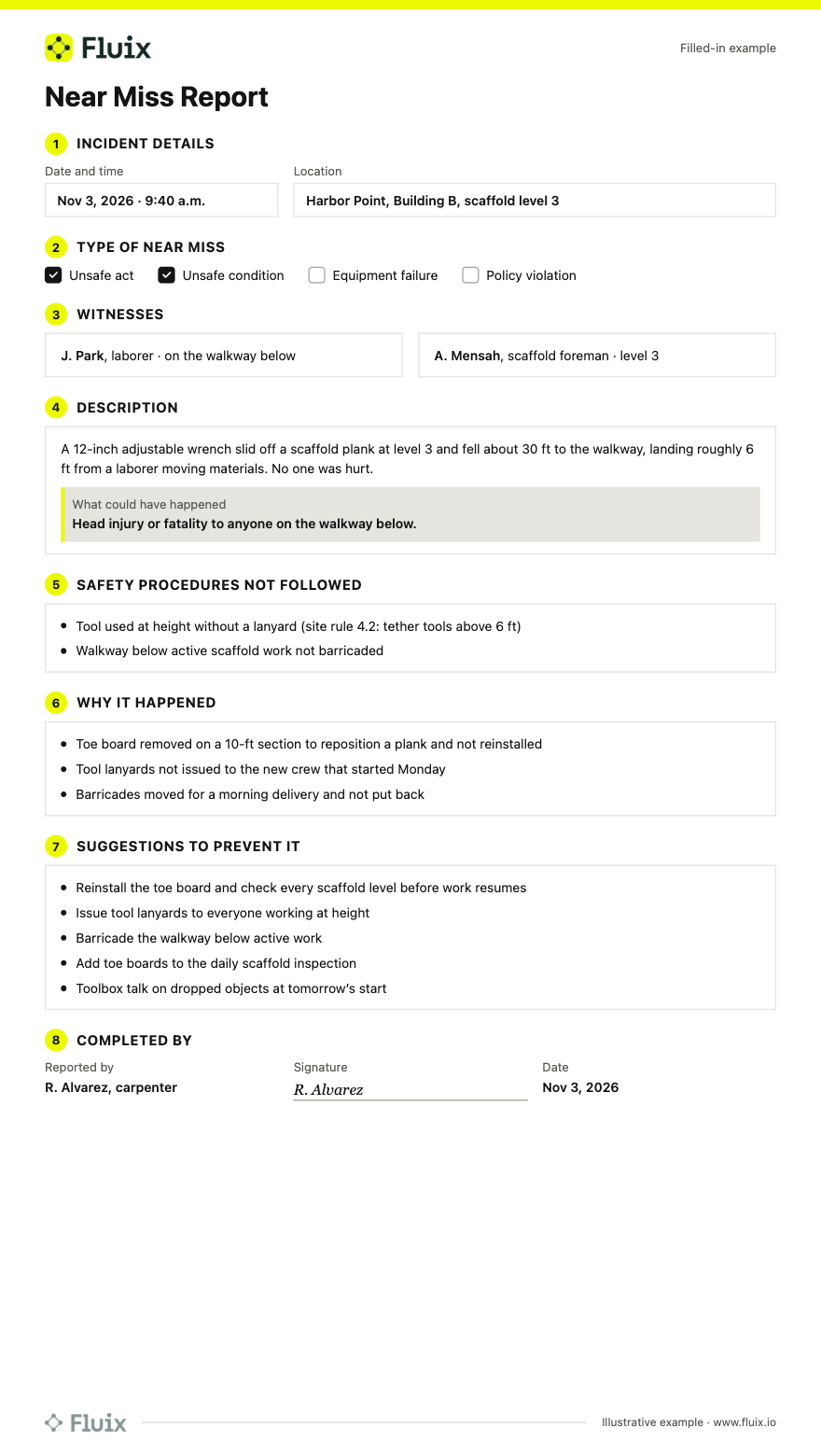
A near miss report template is a ready-made form for recording an unplanned event that could have caused injury, illness, or damage but didn’t. It captures when and where it happened, what type of near miss it was, witnesses, a description of what could have happened, the root cause, and suggestions to prevent it.
What’s Inside the Template
1. Incident details
- Date, time, and exact location of the near miss
2. Type of near miss
- Unsafe act, unsafe condition, equipment failure, or policy violation
- A description field for close calls that don’t fit a category
3. Witness information
- Names, roles, and contact details for follow-up questions
4. Description
- What happened, in sequence
- What could have happened if no one had noticed
5. Safety procedures not followed
- Rules, procedures, or controls that were missed or bypassed
6. Why it happened
- Root cause: lack of training, faulty equipment, missing controls, time pressure, or other factors
7. Suggestions to prevent it
- Ideas from the reporter and crew to fix the cause, not just the symptom
8. Completion details
- Name, signature, and date of the person completing the report
Filled-In Near Miss Report Sample
How to Use This Template in Fluix
Fluix is inspection management software for field teams. Upload this template or rebuild it as a mobile form in Fluix’s incident reporting software, and your crews can:
- Report from the spot, even offline. Fill in the form on a phone or tablet. Data syncs when the device reconnects.
- Add photos, timestamps, and GPS location automatically, with annotations to show exactly where the hazard was.
- Alert the right people. Completed reports go to the supervisor and safety lead automatically, and high-priority close calls trigger notifications.
- Turn suggestions into actions. Assign each fix to an owner with a due date, and track it until it’s closed.
- Include contractors. Subcontractor crews can report through guest access with a QR code or link, without a Fluix account (available on selected plans).
- Spot patterns. Track near misses by site, type, and cause on dashboards, send data to Power BI, or ask questions through Fluix’s AI connectors for Claude, ChatGPT, and Copilot.
Fluix helped Panorama Helicopters implement a reliable safety management system with digital safety reporting.
FAQ
1. What counts as a near miss?
A near miss is an unplanned event where nobody was hurt and nothing was damaged, but a small change in timing or position would have caused harm. Examples include a dropped tool landing near a worker, a forklift reversing past a pedestrian, or a ladder slipping before someone climbs. If you’d be relieved it missed, report it.
2. What’s the difference between a near miss report and an incident report?
A near miss report records a close call where no one was hurt and nothing was damaged. An incident report records an event that caused injury, illness, property damage, or a release. Both look for root causes, but an incident report also covers injuries, treatment, and recordability.
3. Is near miss reporting required by law?
In the US, OSHA doesn’t require employers to report near misses, though it recommends near miss reporting as part of a safety program. In the UK, some near misses are “dangerous occurrences” that must be reported to HSE under RIDDOR. ISO 45001 treats near misses as incidents to report and investigate.
4. How do you encourage workers to report near misses?
Make it fast, blame-free, and visible. Let people report from their phone in under two minutes, thank reporters publicly, and show what changed because of their report. Share one recent near miss at the next toolbox talk so crews see reports lead to fixes, not discipline.
5. How soon should a near miss be reported?
Report it the same shift, ideally right away, while details are fresh and the hazard is still in place. Make the area safe first, then photograph the scene and record what happened. Reporting quickly also lets supervisors warn other crews working with the same equipment or conditions before anyone gets hurt.
6. How do you measure near miss reporting?
The most common measure is the near-miss reporting rate: near misses reported × 200,000 ÷ hours worked. That puts it on the same basis as TRIR. A rising rate usually means better reporting, not a less safe site. See more leading indicators in our guide to safety metrics.
7. Can I fill in this near miss report on a phone?
Yes. Upload the template to Fluix or rebuild it as a mobile form, then complete it on any phone or tablet, even without signal. Add photos and your location, sign on screen, and the report goes straight to your supervisor. You can also print the PDF for sites where paper is still used.
8. What’s the best software for near miss reporting?
The best near miss reporting software makes reporting quick on mobile, works offline, captures photos, and turns suggestions into assigned actions with due dates. Contractor access and trend dashboards also matter. Compare options in our review of the best near miss reporting software for field teams.