


This toolbox talk template gives you one page to record the talk and a second page for crew signatures. It works the same way on a construction site, at a wind farm, in a substation yard, on a plant floor or on an airport ramp.
What Is a Toolbox Talk Template?
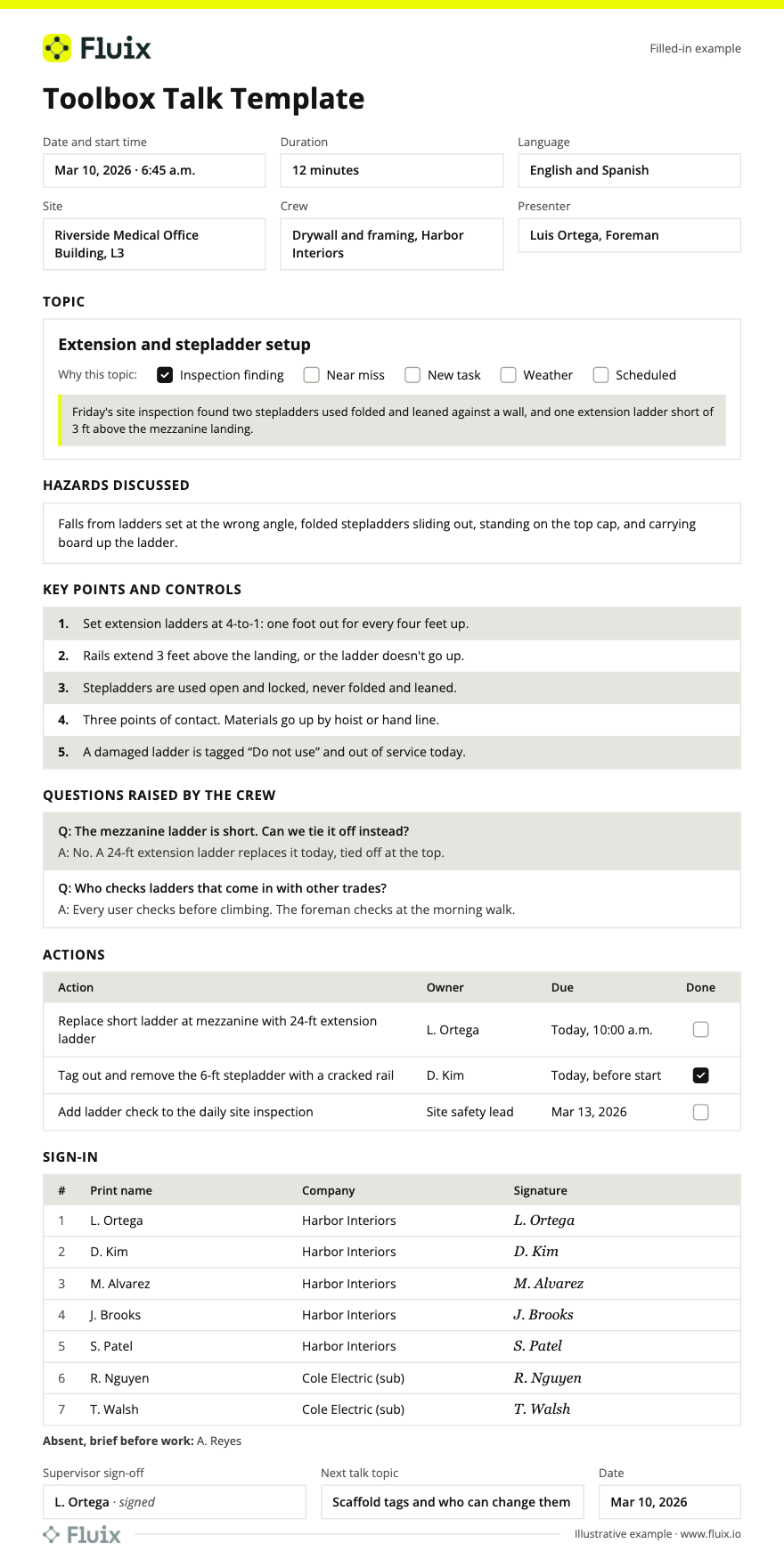
A toolbox talk template is a form for recording a short safety meeting held at the work location before a shift or task. It captures the date, site, presenter, topic, hazards covered, questions the crew raised, actions with owners and due dates, and each attendee’s signature. That signed record proves the talk took place.
What’s Included in the Toolbox Talk Template
Talk details
- Date, start time and duration
- Site or location, project or work order, crew or company
- Presenter name and roleLanguage the talk was delivered in
Topic
- Topic title
- Why you chose it: inspection finding, near miss, new task or equipment, weather, or scheduled
- Hazards discussed
Key points and controls
- Up to five numbered points the crew must remember
Crew input
- Questions or concerns raised, with the answer given
Actions
- What needs fixing, who owns it, due date, done
Sign-in sheet
- 20 lines for printed name, company and signature
- A line for workers who missed the talk and need briefing before they start
- Supervisor sign-off
Wrap-up
- Optional photo box
- Next talk topic
Filled-In Toolbox Talk Template Sample
Use This Template in Fluix
Run this toolbox talk form using toolbox talk software in Fluix on a phone or tablet, and every completed talk is filed automatically.
- Signatures on one device: each attendee signs on the presenter’s phone or tablet, with time and location stamped on the record.
- Photos in the record: add pictures of the hazard or the corrected setup to the talk.
- Works offline: complete talks in a basement, on a turbine or at a remote pad. They sync when the device reconnects.
- Recurring talks on schedule: set daily or weekly talks per crew, with reminders and overdue alerts.
- Attendance and completion reporting: see which crews held talks and who signed, and send data to Power BI or your storage system.
- Contractors included: invite external users as guests so subcontractor crews sign the same record.
- Talks connected to inspections: turn concerns into tasks with owners and due dates.
Centuri runs weekly toolbox talks and other field forms in Fluix for 2,000 app users, and cut reporting time by 50–75%.
FAQ
- What should a toolbox talk template include?
At minimum: date, site, presenter, topic, hazards discussed, key points, questions raised by workers, actions with an owner and due date, and each attendee’s printed name and signature. Add duration, language and a supervisor sign-off so the record holds up when a client, auditor or inspector asks what the crew was told and who heard it.
2. How long should a toolbox talk be?
Most run 10 to 15 minutes; Cal/OSHA’s construction guidance describes tailgate meetings as “10-15 minute on-the job meetings.” A five-minute talk works for a single hazard tied to today’s task. If it runs past 20 minutes, it is training and should be planned and recorded as training. Keep the toolbox talk record with your other essential safety documents.
3. How often should you hold toolbox talks?
Weekly is a common baseline, and daily is better for high-risk work. ABC’s 2026 Health and Safety Performance Report found that contractors holding daily talks had 59% lower TRIR than those holding them monthly. California construction requires them at least every 10 working days, and Washington at least weekly.
4. How long should you keep toolbox talk records?
Federal OSHA sets no retention period for toolbox talks, but some states do. Oregon requires construction, utility and manufacturing employers to keep meeting records for three years. Washington’s WAC 296-155-110 requires minutes kept for at least one year. Many companies keep them for the life of the project plus any claims period.
5. Who should sign the toolbox talk sheet?
Everyone who attended the full talk, including subcontractor workers, plus the presenter and the supervisor who signs it off. Have people sign at the end, not at the start. Anyone who missed it should be briefed on the same topic before starting work and sign separately, so your attendance record matches who was actually on shift.
6. Are toolbox talks required?
Federal OSHA doesn’t require toolbox talks by name. It does require training: under 29 CFR 1926.21(b)(2), construction employers must “instruct each employee in the recognition and avoidance of unsafe conditions.” A signed toolbox talk record is one of the simplest ways to show that instruction happened and what it covered. Some jurisdictions go further: General contractors, owners and insurers often require documented talks in contracts and prequalification too, even where the law doesn’t.
7. What’s the difference between a toolbox talk and a safety meeting?
A toolbox talk is a short safety meeting at the work location on one topic, usually before a shift. “Safety meeting” is broader and can mean a monthly committee meeting, a site-wide stand-down or a planning session. Pick toolbox talk topics from your current safety protocols and the hazards your crew faces that week.
8. Can I fill in this toolbox talk template digitally?
Yes. The PDF has fillable fields, so you can complete it on a computer or tablet and print the sign-in page for signatures. For signatures on a phone, offline use and automatic filing, run the same form in Fluix, where each attendee signs on the presenter’s device and the record is saved as a PDF.