A site inspector completes anywhere from 2 to 15 inspection reports a day. Most of the data in them (location, asset ID, crew lead, equipment codes) repeats across every report. Typing it in every time takes time.
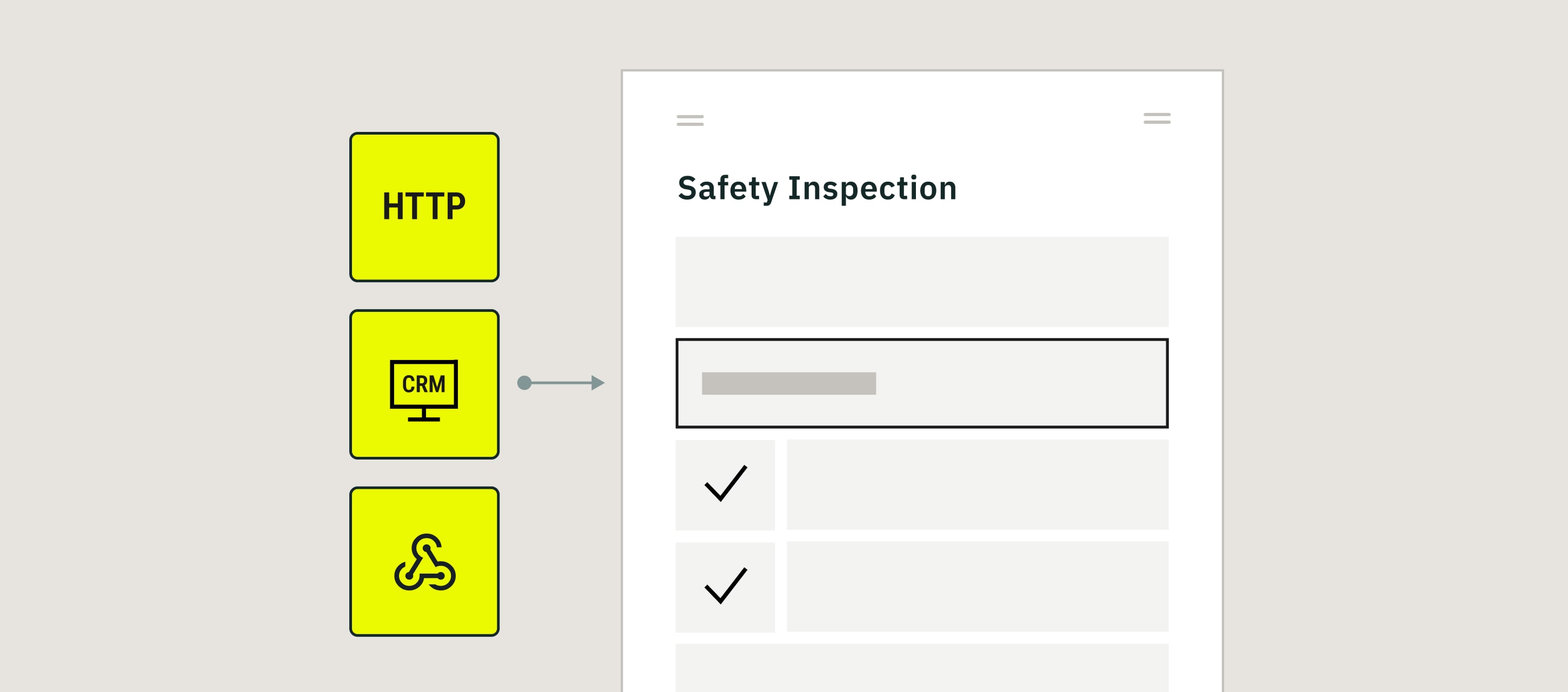
Fluix solves this by pulling repeat data automatically from the systems where it already lives — a previous inspection, a CRM record, a spreadsheet, an API call, a webhook from another tool.
In this guide, I’ll walk through how prefill works in Fluix, the four different ways teams set it up, and the habits that make it run smoothly.
Note: Data Prefill is available from the Crews plan. Compare Fluix pricing plans to see what’s included.
Contents:
What Is Data Prefill?
Data prefill is the practice of auto-populating form fields with information that already exists somewhere else — a previous submission, a database, a CRM record, an uploaded spreadsheet, or an incoming webhook.
Instead of re-entering the same data every time, the form opens with the repeat fields already filled, so the person completing it only enters what’s actually new.
For inspection workflows, data prefill is an automation that removes the manual data entry burden from every recurring report. Location, asset ID, crew name, previous findings, equipment codes: all filled automatically before the inspector opens the form.
Good data prefill shares four traits:
- It pulls from multiple data sources — previous form submissions, uploaded files, external APIs, webhook triggers — so teams aren’t locked into one workflow pattern
- It respects existing permissions — the prefill mechanism only surfaces data the current user is allowed to see
- It’s editable in the field — prefilled data can be reviewed, updated, or replaced if site conditions have changed
- It runs invisibly — the inspector opens the form and it’s already prepared
Most inspection tools handle one or two of these. The ones like Fluix handle all four turn recurring inspections into a genuinely faster workflow.
How Fluix Handles Data Prefill
Fluix is inspection management software for field teams that gives you four different ways to prefill your forms. You can use just one, or mix and match depending on your workflow needs.
Method 1 — Prefill from Previously Completed Forms
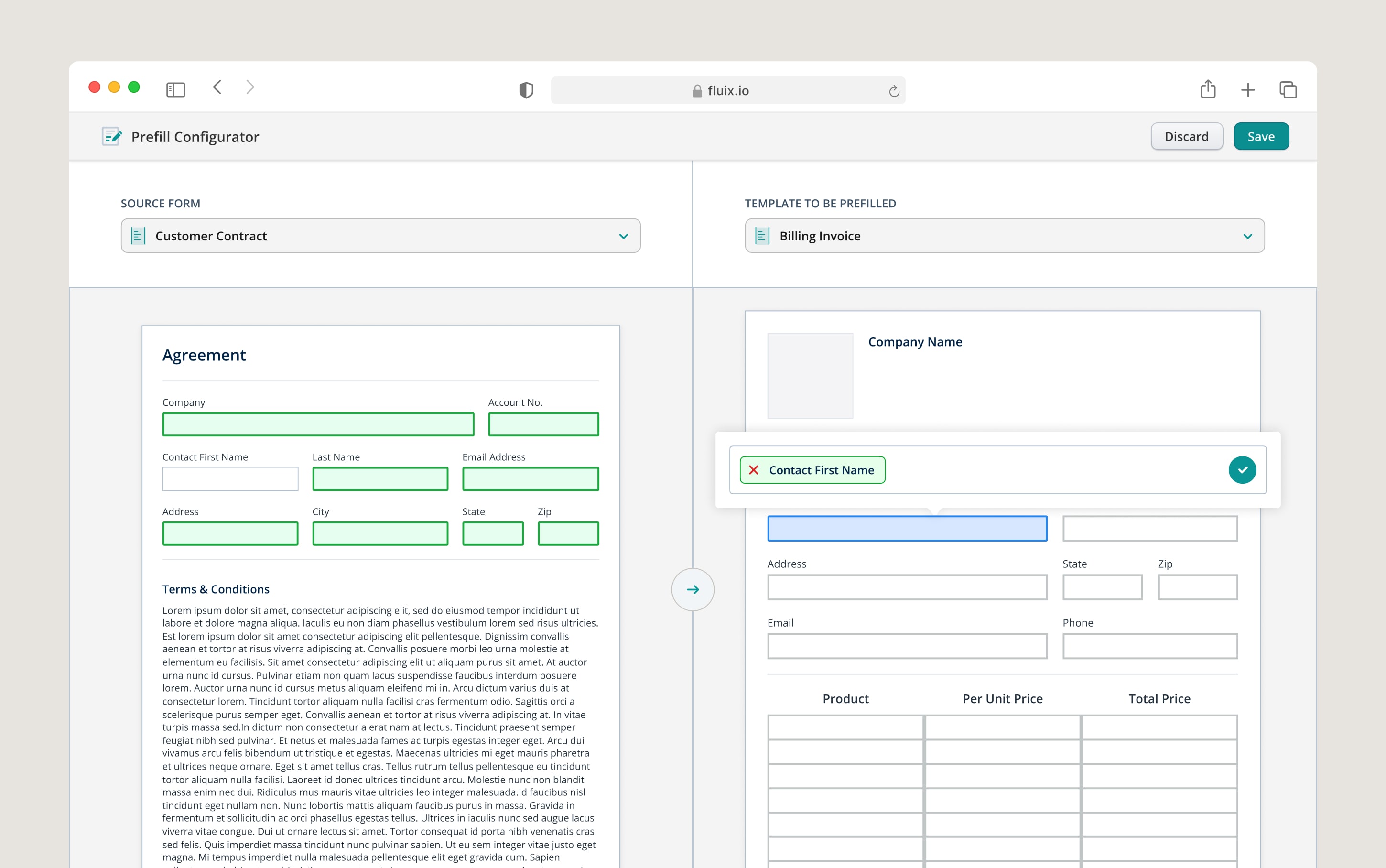
This method uses data your team has already entered in past inspections. When they submit a form through a Fluix task, that information can be reused to automatically fill out future forms.
The setup is straightforward. Pick the form, and map which fields should carry over.
Method 2 — Prefill Dropdowns from a Data File
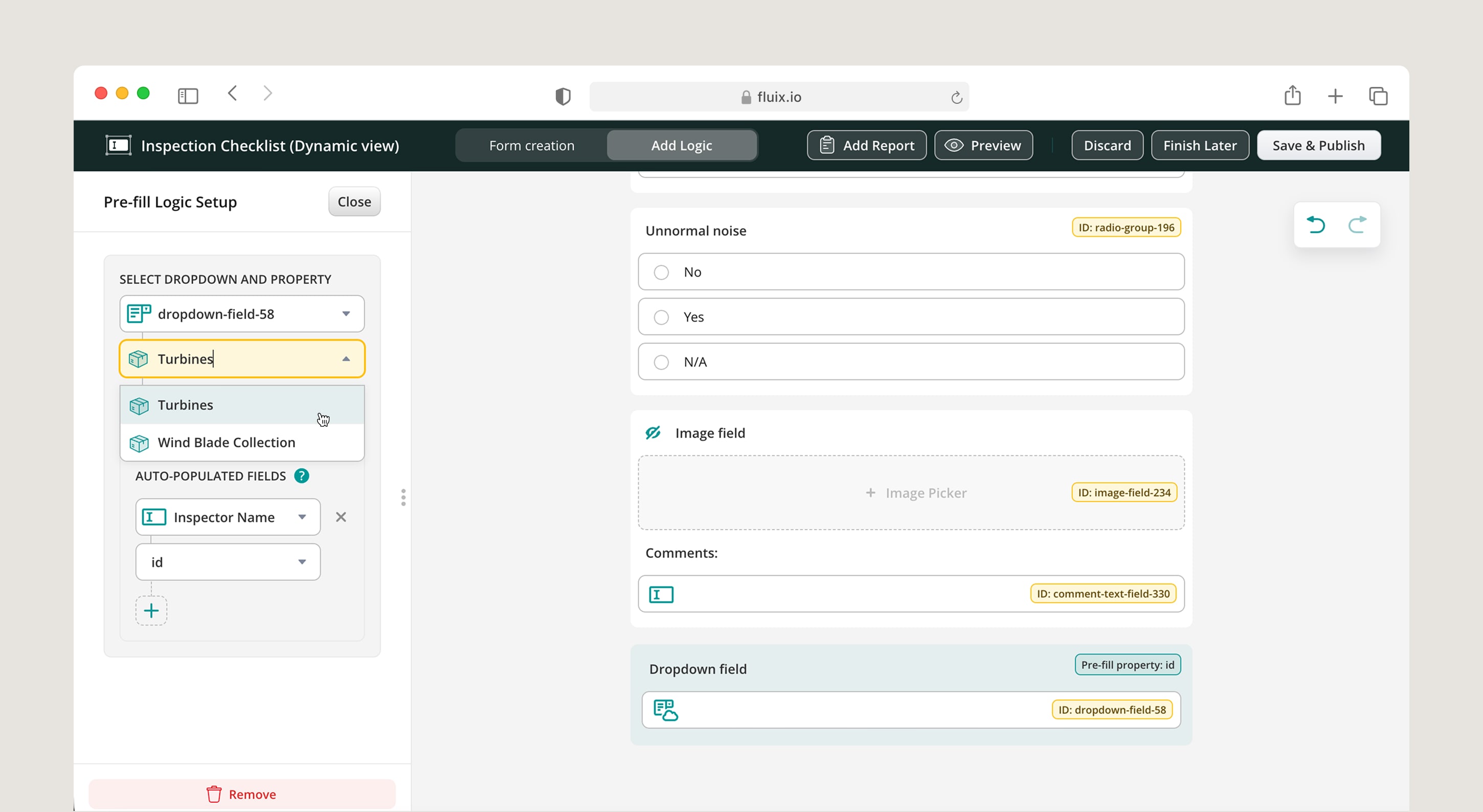
When your forms use dropdowns with information that changes regularly (team members, project sites, equipment lists, etc.) you can link the dropdown to an uploaded CSV file.
Start by preparing your data in a spreadsheet or exporting it from your internal database as a CSV. Upload the file into Fluix and choose which column feeds the dropdown.
Method 3 — Prefill from External Tools, Initiated by Fluix
You can connect Fluix to any tool that exposes an API and pull data directly into your inspection forms mid-workflow. Fluix sends a request to the external tool, retrieves the data, and uses it to fill the form fields before the inspector starts.
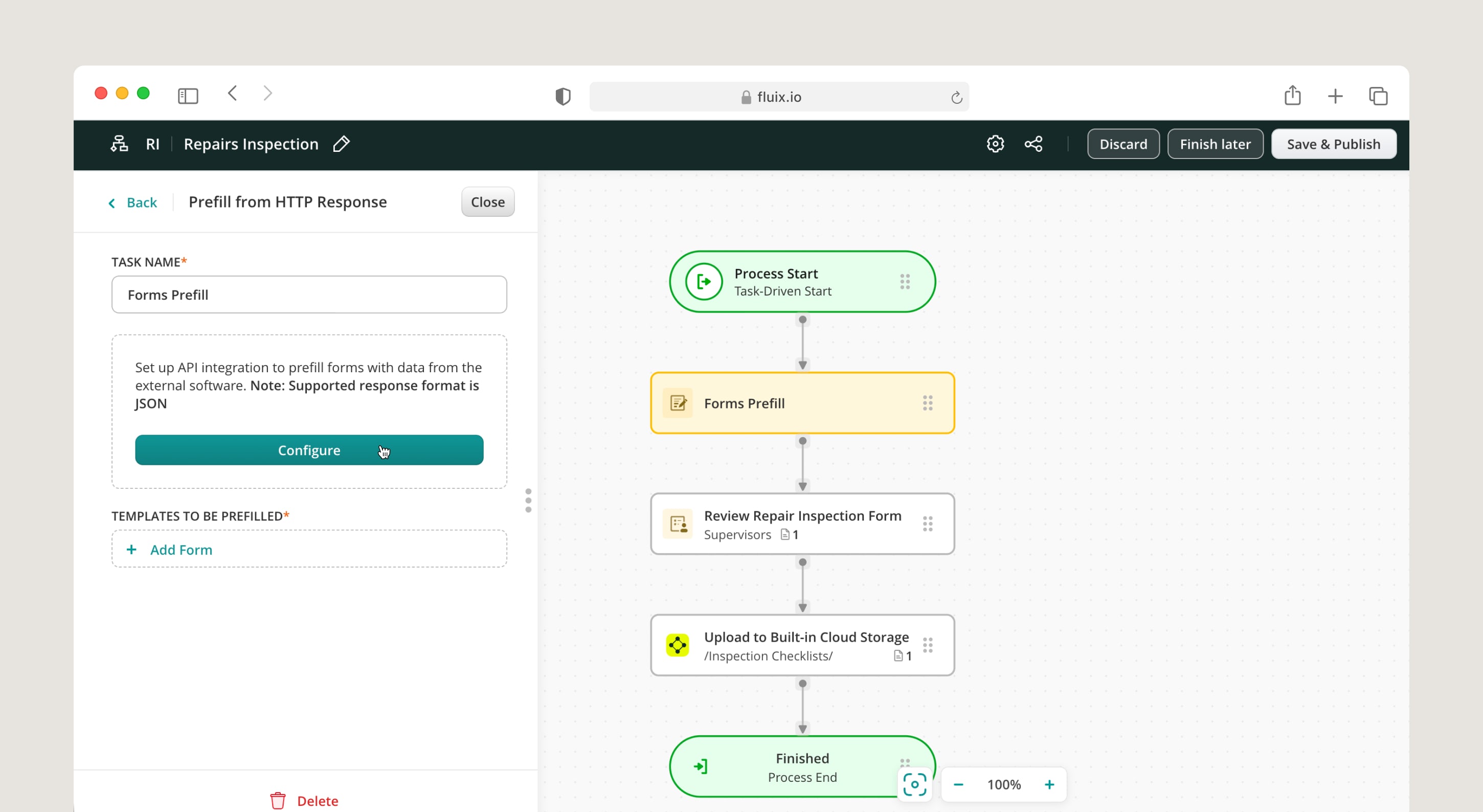
Method 4 — Prefill Triggered by an External Tool
Here, the other tool starts the process. When something changes in that system — a new record, a status update, a closed deal — it triggers Fluix to create a task with prefilled data via webhook. The task appears in Fluix already prepared, and the field team gets a notification.
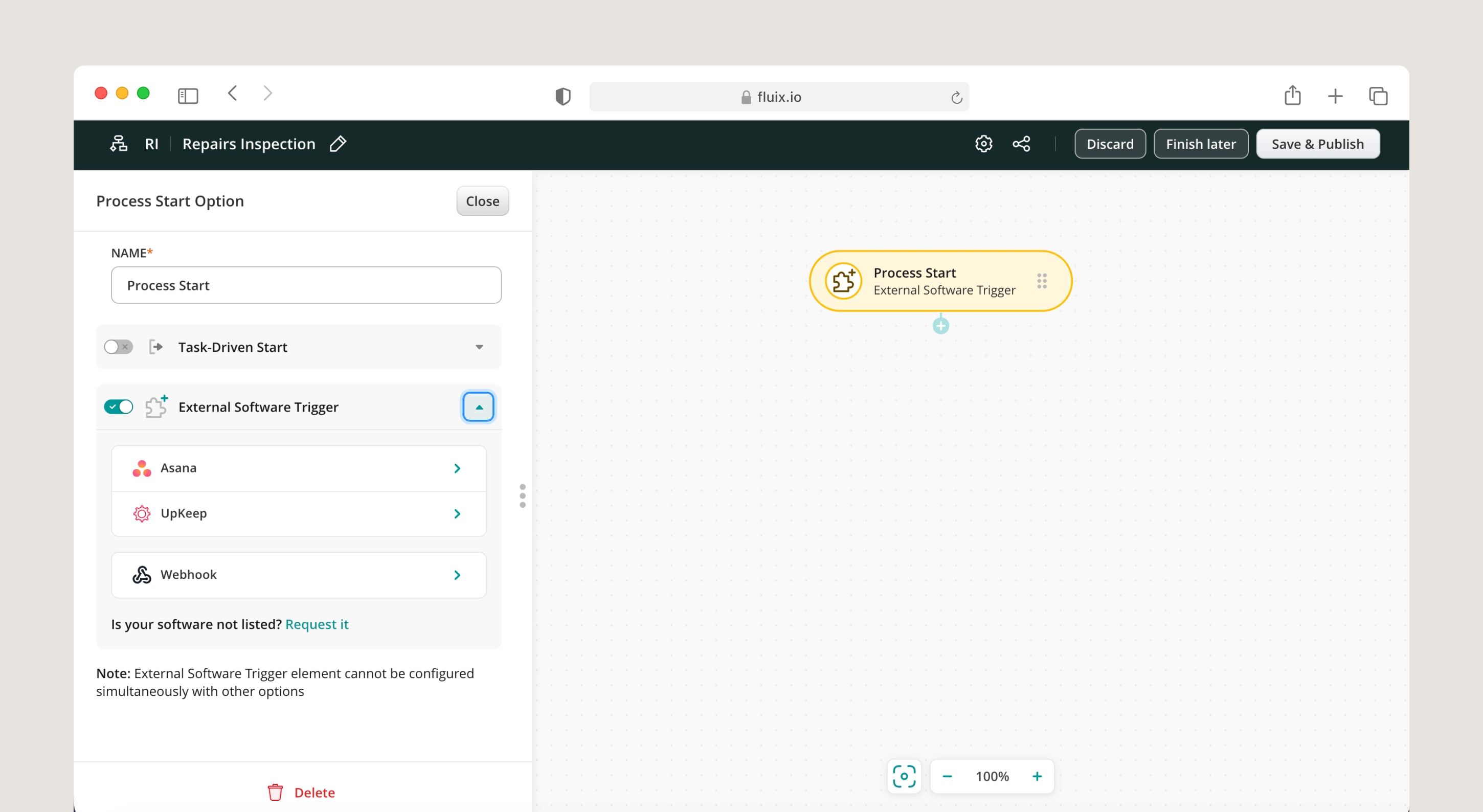
Which Method Fits Your Workflow
- Method 1 if your data lives inside Fluix and just needs to move from task to task
- Method 2 if you want to connect a spreadsheet or database to a dropdown field
- Method 3 if you want Fluix to fetch data from another tool as part of your workflow
- Method 4 if the other tool should kick off the Fluix process
For detailed setup steps on each method, see the Fluix Forms Prefill setup guide >
? Already a Fluix customer? Data prefill is in your account right now if you’re on the Crews plan or above. Set up your first prefilled workflow in about 10 minutes — start with Method 1 if this is your first time.
? New to Fluix or just want to try it? Start a free trial and set up your first prefilled workflow in about 10 minutes.
What Problem Data Prefill Solves
Manual re-entry looks manageable when you have a handful of inspections a day. But it breaks down when you have dozens across a team, over a month, across sites. Five patterns show up across every inspection team we at Fluix work with.
- Repeat entry burns inspector time. If a field inspector completes 10 reports a day and 40% of each form is repeat information — location, asset ID, crew lead, equipment codes — that’s roughly 4 forms’ worth of retyping every single day. Across a 10-person team, five days a week, that’s 200 forms of repeat data entry weekly.
- Manual re-entry introduces errors. Every time someone retypes an asset ID or a serial number, there’s a chance of a typo. A single wrong digit means the wrong asset gets flagged, or the compliance report doesn’t match the physical equipment.
- Inspection data lives in multiple systems. Most inspection teams don’t work in Fluix alone. They have a CRM with customer records, a maintenance system with equipment details, a scheduling tool with crew assignments. Prefill matters most when it bridges these systems.
- Onboarding new team members takes weeks longer than it should. A new inspector who joins the team needs to learn what fields to fill, where the reference data lives, and how to look up asset IDs. All of that context — which prefill handles automatically — becomes onboarding overhead when the forms are blank.
- Consistency breaks down across a growing team. When 20 inspectors are all filling out forms from scratch, small variations creep in — different formats for asset IDs, different spellings for site names, different levels of detail in the same field.
- How teams solve it: A wind energy operator uses Method 3 to pull turbine metadata (turbine ID, blade specs, install date) from an external asset database. Every inspection across every technician uses the same identifiers.
What customer say about data prefill in Fluix:
“Our office staff pre-fill forms before handing them over to the production team in the field. Our installers then access the forms on an iPad and do all of their work onsite on one small, portable device. Fluix makes things easier for everyone.” Ale Garofalo, Corporate IT Director, Synergy.
“Instead of giving field staff multiple job folders with hundreds of copies of documents, we give them a tablet with prefilled templates and digital signatures.” Lachlan Jamieson, Project Manager, NKT Australia
Data Prefill Best Practices
These six practical habits make Fluix data prefill work smoothly across your inspection workflows.
1. Start with Method 1 if this is your first prefill setup.
Prefilling from previously completed forms is the fastest to configure, the easiest to test, and the pattern that covers the most common recurring-inspection use case. Get comfortable with it before moving to API or webhook methods.
2. Keep your CSV data sources clean.
For Method 2, the dropdown is only as good as the file behind it. Establish an owner for the master CSV, a review cadence (weekly or monthly), and a clear naming convention. A dropdown that shows deleted equipment or misspelled site names creates the same errors prefill was meant to prevent.
3. Test API prefill in staging before rolling out to the field.
For Method 3, API-based prefill depends on the external system being reachable and returning data in the expected format. Test the workflow end-to-end in a staging environment before assigning it to a technician on a rig or at 80 metres up a turbine — the field is not the place to discover the API is timing out.
4. Let inspectors review prefilled data before submitting.
Prefill saves time, but it isn’t a substitute for verification. Site conditions change. Equipment gets moved. Yesterday’s crew lead isn’t today’s. Build a quick review step into your workflow so inspectors confirm the prefilled fields still match reality before they submit.
5. Map fields once, review them quarterly.
The workflow that maps which fields prefill from which source needs a periodic check. Assets get retired, form templates get updated, integrated systems change their API. A quarterly review of your prefill configurations catches drift before it causes silent failures.
6. Combine prefill with automated file naming for full automation.
Prefill fills the form before submission. Automated file naming names the completed record after submission. Together, they turn an inspection into a fully hands-free record generation workflow — the inspector captures the on-site data; everything else handles itself.
Related: Prefill starts your inspection workflow. Automated file naming in Fluix closes it — every submission saves with a consistent, descriptive filename.
Fluix Data Prefill FAQ
- What is data prefill?
Data prefill is a workflow automation that auto-populates form fields with information from an existing source — a previous submission, an uploaded CSV, an API-connected system, or a webhook from another tool.
2. What does prefilled mean in the context of forms?
A prefilled form is one that opens with some or all of its fields already populated with data. The person completing the form only enters what’s actually new or has changed — everything else is already there from a data source configured in advance.
3. What does prefilled information mean?
Prefilled information is form-field data that appears automatically when the form is opened, rather than being typed in by the user. The information comes from a source connected to the form — a previous submission, a database, a CRM record, an API call, or a webhook trigger.
4. How do I prefill forms in Fluix?
Fluix supports four prefill methods: from previously completed forms, from an uploaded CSV file, from an external tool via API (initiated by Fluix), or from an external tool via webhook (initiated by that tool). You choose the method based on where your data lives and how your workflow runs. The [Fluix Forms Prefill setup guide](LINK: fluix.io/help/forms-prefill-in-fluix) walks through the configuration for each method.
5. Can I prefill Fluix forms from my CRM?
Yes. Fluix connects to CRMs like HubSpot and Salesforce via API (Method 3) or webhook (Method 4). Customer name, address, deal details, and any other CRM field can auto-populate the inspection, quote, or contract form when it’s opened.
6. Can I prefill Fluix forms from a spreadsheet or database?
Yes. Upload a CSV to Fluix and link it to a dropdown field (Method 2), or connect Fluix to your database via API (Method 3). Both approaches let you keep the source data outside Fluix and have it feed the form automatically.
7. Which Fluix plan includes data prefill?
Data prefill is included from the Crews plan onward. [Compare Fluix pricing plans](LINK: fluix.io/pricing) for the full breakdown.
The Bottom Line
The real value of data prefill is that recurring inspections stop being data-entry exercises, and inspectors look at what’s actually in front of them.
Fluix data prefill is one of the automations inside Fluix’s software trusted by 12,000 field service teams to run inspections, safety, and compliance in the field. Prefill from previous submissions, from spreadsheets, from CRMs, from any API-connected system. Set up once per workflow, then run for years.