


Welding a bracket on a factory floor, cutting pipe in a plant room, grinding in a turbine nacelle, or torching on roof membrane all need the same thing: someone has to authorize the job before work starts and confirm the area is safe after it ends. A hot work permit template covers both.
What Is a Hot Work Permit?
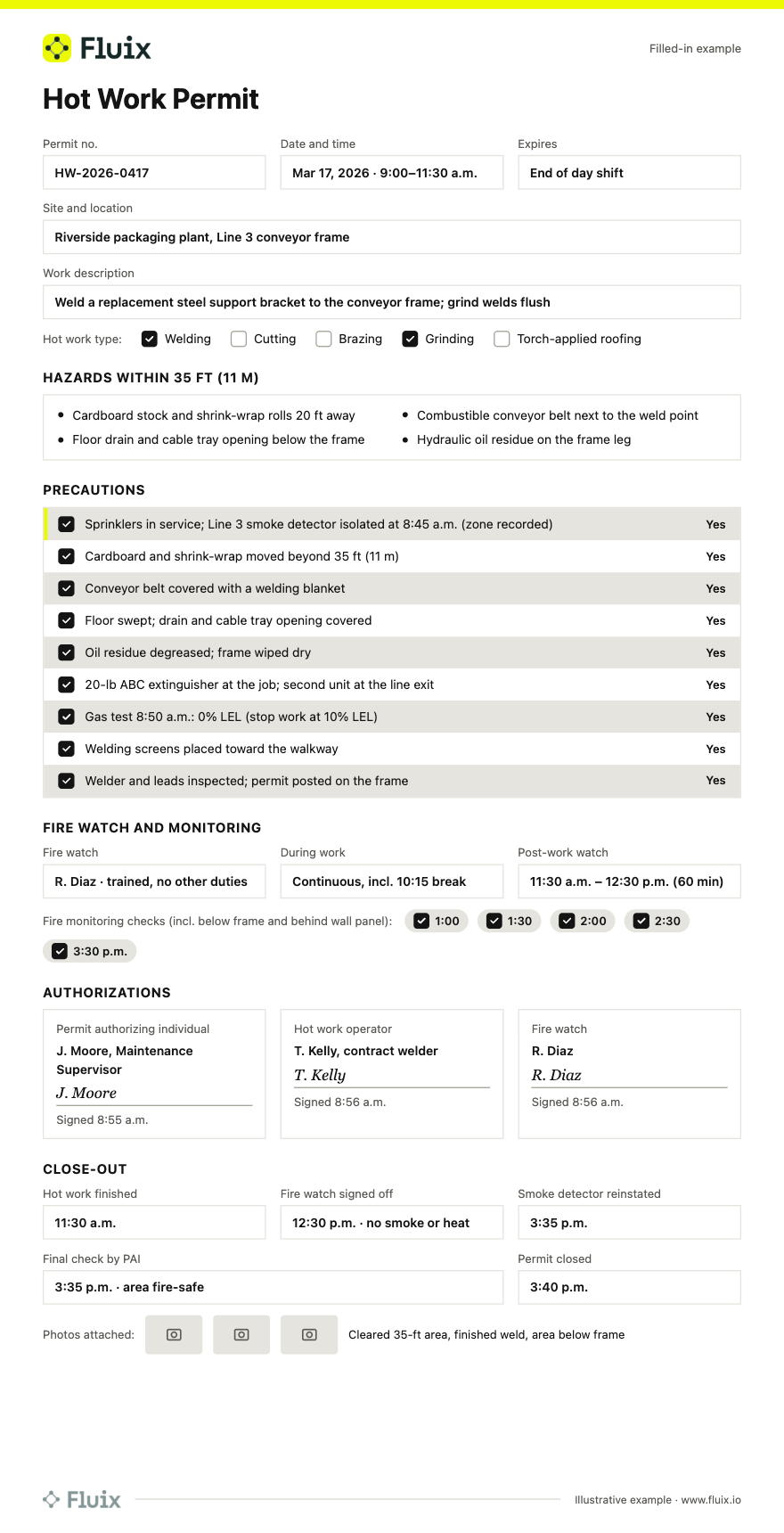
A hot work permit is a documented authorization for one job that produces flames, sparks, or heat (welding, cutting, brazing, grinding, or torch work) at one location for one shift. It records the hazards, the fire precautions within 35 ft (11 m), the named fire watch, and the post-work close-out before the area returns to normal use.
What’s Inside the Hot Work Template
1. Permit and job details
- Permit number, site, exact location, and asset ID
- Type of hot work and job description
- Start time and expiry (one shift maximum)
- Contractor company, if any
- “Is there a safer alternative?” check
2. Hazards
- Combustibles within 35 ft (11 m), including above, below, and behind walls
- Flammable liquids, gases, vapors, and dusts
- Concealed spaces, insulated panels, and enclosed equipment
- Site-specific safety hazards noted in the risk assessment
3. Precautions checklist
- Sprinklers and detection in service, or the isolated zone recorded
- Fire extinguisher at the work location
- Combustibles moved 35 ft away or covered with fire-resistant blankets
- Floors swept; wall and floor openings covered
- Flammable gas test recorded (% LEL), where needed
- Equipment inspected and permit posted at the job
4. Fire watch and monitoring
- Named fire watch with no other duties
- Watch during work and breaks
- Post-work fire watch end time
- Fire monitoring check times
5. Authorizations
- Permit authorizing individual (PAI)
- Hot work operator
- Fire watch
6. Close-out
- Area and adjacent spaces found fire-safe
- Detectors reinstated and equipment removed
- Final check time, signature, and photos
Filled-In Hot Work Permit Sample
How to Issue and Close a Hot Work Permit
- Ask whether hot work is needed. Use a cold method (bolting, mechanical cutting, press-fit fittings) or move the work to a designated shop if you can.
- Inspect the area. Walk the 35-ft (11 m) radius, including above, below, and behind walls.
- Apply the precautions. Move or cover combustibles, cover openings, place an extinguisher, test for flammable gas where needed, and confirm sprinklers are in service.
- Assign a fire watch. Name a trained person with no other duties.
- Authorize and post. The PAI signs only after checking the precautions in person. Post the permit at the job.
- Work and watch. Stop the work if conditions change or the fire watch leaves.
- Run the post-work watch and monitoring. Keep the fire watch for the required time, then run the monitoring checks.
- Close out. Do a final check, reinstate detection, attach photos, sign, and file the permit.
Digital Hot Work Permits in Fluix
Paper permits get lost, signed in the office, and closed early. Using safety inspection software in Fluix, you can turn this template into a mobile permit your crews complete on site, as NFPA 51B’s “documented permit” wording now allows.
- Multi-step approvals: the permit goes to the PAI, who can approve it or send it back with notes before work starts.
- Digital signatures: the operator, fire watch, and PAI each sign with a timestamp.
- Photos: attach before-and-after photos to the permit.
- Offline mode: fill in and sign permits in a basement, a hangar, or a nacelle with no signal; data syncs when you reconnect.
- Close-out you can audit: completed permits are stored with their full history.
- Guest access: contractors can complete their part through a link or QR code without a paid seat (Operations plan).
FAQ
- Is this hot work permit template free?
Yes. The hot work permit template is a free PDF. Print it, fill it in by hand, and post it at the job. If you want approvals, signatures, and photos on a phone or tablet, you can use the same template in Fluix.
2. How long does a hot work permit last?
A hot work permit should cover one job, at one location, for no more than one shift. When the work, location, crew, or day changes, issue a new permit. The UK Joint Code of Practice bans blanket permits covering several days and suggests a fresh permit when work runs from morning into afternoon.
3. How long must a fire watch stay after hot work?
OSHA requires at least half an hour after welding or cutting ends in general industry. NFPA 51B (2024) requires at least 60 minutes, which the PAI may reduce to 30 minutes, plus up to 3 hours of fire monitoring. In the UK, HSG168 asks for one hour of continuous watch and a check at two hours.
4. Is there a hot works permit template for the UK?
Yes. This template works for UK hot works: record precautions within 10 m as well as 35 ft, use at least two extinguishers, and set the fire watch to HSG168 (one hour, plus a check at two hours). The HSE’s fire safety in construction guidance explains how permits fit with your fire risk assessment.
5. Who can sign a hot work permit?
Under NFPA 51B, the permit authorizing individual (PAI) signs. This is a trained person designated by management to check the area and approve the precautions. The hot work operator and the fire watch also sign. The person doing the welding can’t act as their own fire watch.
6. What is the difference between a hot work permit and a hot work program?
A hot work program is the written policy: who can be a PAI, which areas are designated for hot work, training, and recordkeeping. A hot work permit applies that program to a single job. Brief crews on both with a toolbox talk topic before hot-work-heavy shutdowns.
7. Can I use a digital hot work permit instead of paper?
Yes. The 2024 edition of NFPA 51B changed “written” permits to “documented” permits to cover digital platforms. A digital permit still needs the same precautions, named people, signatures, and close-out times. It makes it easier to show your insurer or an inspector that the fire watch ran its full time.
8. How do I use this template in Fluix?
Upload the PDF or start from the Fluix template, add the PAI as an approval step, and share it with your crews and contractors. Crews fill in and sign the permit on site, even offline, and attach close-out photos. Completed permits are stored for audits.