


Fluix Reports are designed to help you track team activity, manage tasks, monitor work progress, and streamline document flow.
How to Export Data from Reports
To export data from Reports to a third-party platform, follow these steps:
- Go to Reports: Open the Reports section in the Admin Portal and select the report you want to export.
- Click Export: In the opened panel, you will see four options:
- To share the created report with other Fluix admins. Learn more about Reports ownership in this tutorial.
- Download report in CSV or XLS formats with the filtered data as a report to share with your team, stakeholders, or management as a file.
- Export data via API. Send data directly to third-party software like Power BI or Tableau for further analysis and visualization.
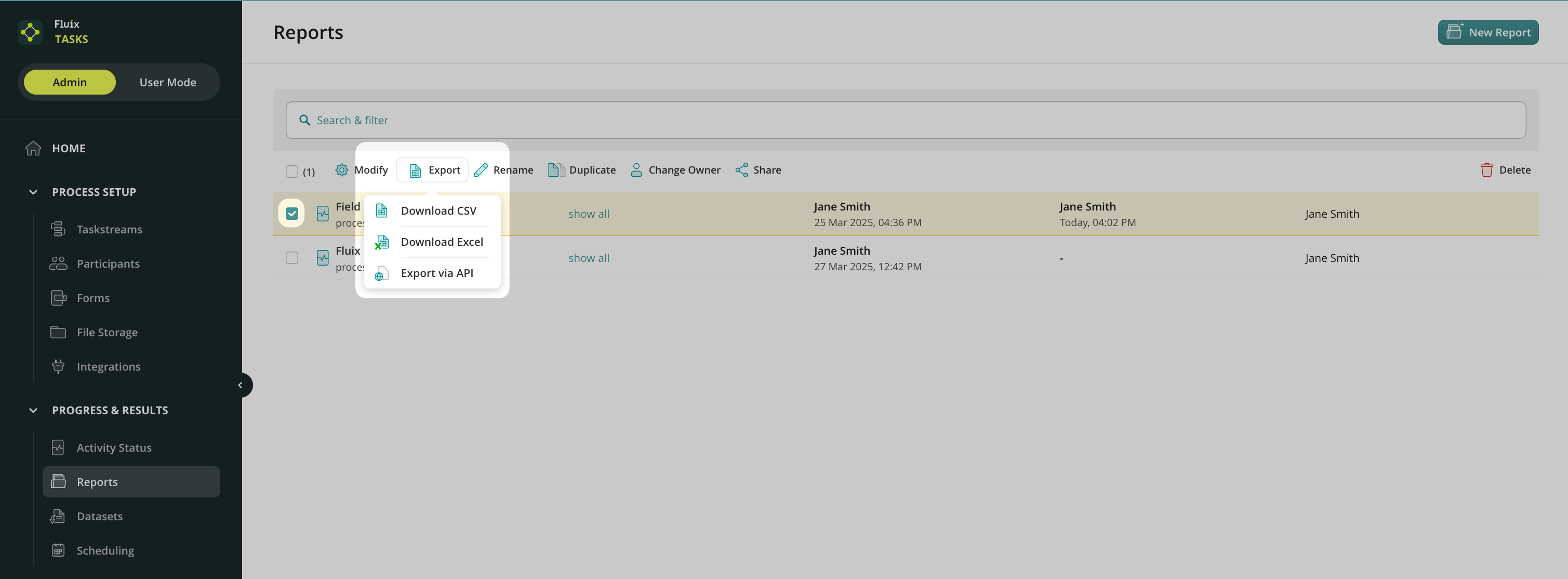
How to Export Data from Reports via API?
- Select Export via API from the list.
- A window with Authorization Details will open.
- Copy the authorization link provided.
- Use this link in your third-party platform to create a request to an endpoint and receive the exported data.
You may create the report based on the following view types: Process or Form. Depending on the selected option, after exporting data from reports via API, there might be two following endpoints.
Example of the request for Report view by Process:


GET {api_url}/customer-api/v1/reports/process-view/aabb34e4-4fb7-483e-a5e7-f32bd07c596f?size=2


Example of the response:
{
  "collection": [
    {
      "Process Key": "QAI-1",
      "Taskstream Name": "Quality Assurance Inspection",
      "Task Name": "Upload to Storage",
      "Assignee": "",
      "Task status": "FINISHED",
      "Due Date": "",
      "Last Action": "2024-12-31 10:59:38",
      "Task Completion": 100,
      "Duration": "1m",
      "Inspector Name": ""
    },
  ],
  "hasNext": true,
  "nextUrl": "{api_url}/customer-api/v1/reports/process-view/aabb34e4-4fb7-483e-a5e7-f32bd07c596f?size=2&cursor={some_cursor}
}

Example of the request for Report view by Form:
GET {api_url}/customer-api/v1/reports/process-view/aabb34e4-4fb7-483e-a5e7-f32bd07c596f?size=2Example of the response:
{
  "collection": [
    {
      "Form": "Commissioning Checklist",
      "Process Key": "CI-2",
      "Taskstream Name": "Commissioning Inspection",
      "Task Name": "Verify the checklist",
      "Assignee": "Quality Manager",
      "Task status": "TODO",
      "Due Date": "",
      "Last Action": "2025-02-21 14:24:18"
    },
    {
      "Form": "Change Order (PDF view)",
      "Process Key": "CO-2",
      "Taskstream Name": "Change Order",
      "Task Name": "Review Change Order",
      "Assignee": "Supervisors",
      "Task status": "TODO",
      "Due Date": "",
      "Last Action": "2025-02-21 14:24:12"
    }
  ],
  "hasNext": true,
  "nextUrl": "https:\/\/admin-ewn-25654-export-tbw-repots.sand.fluix.io\/customer-api\/v1\/reports\/form-view\/e1c770c3-cad4-4977-80ab-27c21b93a91f?size=2\u0026cursor=WzE3NDAxNDc4NTIwMDBd"
}
If you have any questions, feel free to contact us at support@fluix.io.