


Cloud storage providers
To connect your company storage to Fluix workflows, please proceed to the Integrations tab under the Workflow Setup section, click on Connect Storage button, and select the storage you want Fluix to grant access to. You will see a sidebar with all the available storages to connect:
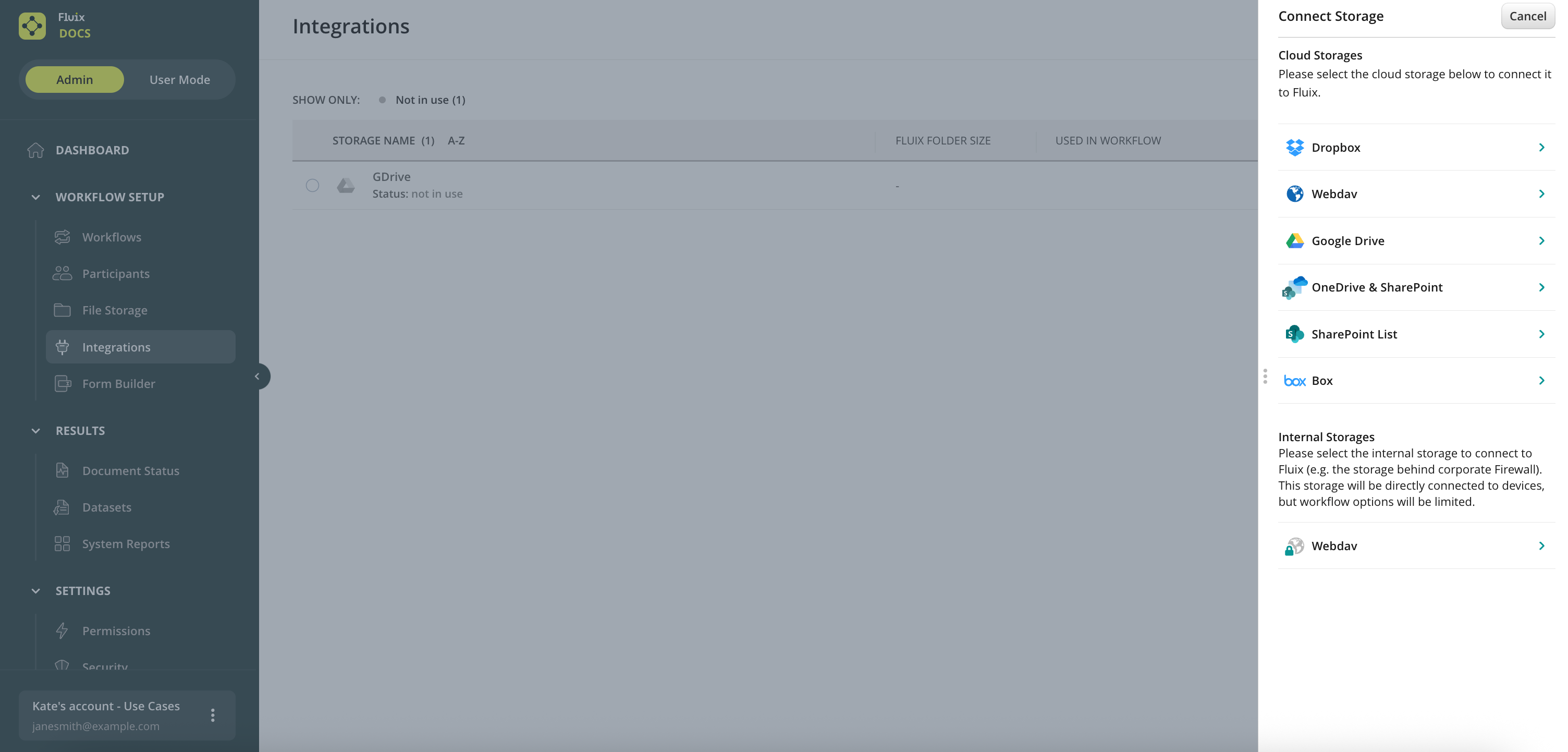
Upon choosing storage, you will be redirected to the storage authorization page to confirm granting access to Fluix.
Once done, navigate to the Workflows tab under the Workflow Setup section to create a workflow for the documents on your storage.
Storage Behind Firewall
There’s also a possibility to connect Fluix directly to the internal storage (e.g. the storage behind the corporate Firewall).
This will prompt your users to enter their credentials upon accessing documents on an iPad or an iPhone thus eliminating the need to create individual workflows for each user.
Setup
- Go to Workflow Setup in Admin Portal and then select Integrations.
- Click on Connect Storages and scroll down to Internal Storages where you can select either WebDav connection.
- After the storage has been connected, you can proceed with the workflow setup. Go to Workflows -> New Workflow, in the dropdown window select Internal Workflow and proceed with building a workflow.
Note that this type of workflow does not support any submit rules. Annotated files can be either saved as a local copy on the device or synced back to the storage (See the options in the screenshot down below).
Feel free to contact us at support@fluix.io if you have any questions or comments.
In case you do not yet have company storage, consider Fluix built-in file storage.