


In the System Reports tab of the Results section you can see the list of workflows in your account and their main parameters like number of submits, completed and sent for signature documents. The period of time can be selected in the top right corner.
By clicking on any workflow you will get more details on documents routed within a workflow.
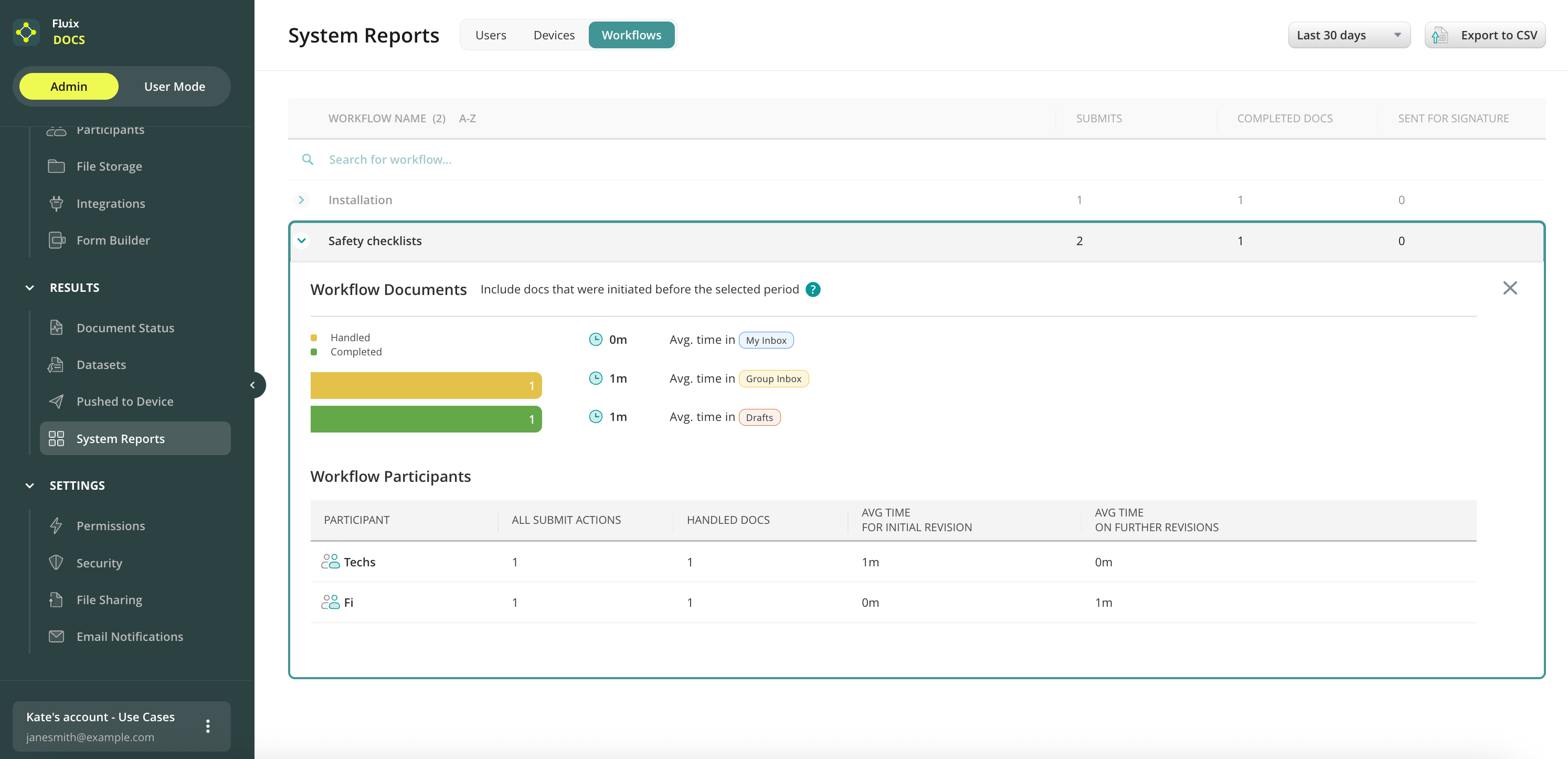
Handled are the documents that were changed at any stage for the period selected.
Completed are those documents that were submitted to the final destination (uploaded to storage, emailed to office, etc.).
Workflow Participants table includes:
Participants — users and groups that participated in a workflow.
All Submit Actions — include all reassigns, submits to completed state, resubmits from completed, documents sent for signature.
Avg Time For Initial Revision — this is the average time a document in this particular workflow stays from the initial stage (Templates, My Inbox, Group Inbox, Cabinet) until its submit to further stage.
Avg Time on Further Revisions — shows the average time of the document that was taken for the second time and afterwards, e.g. from the Completed tab to Drafts.
Feel free to contact us at support@fluix.io if you have any questions or comments.