


The Templates Sync Status section is located in each workflow where the Templates are selected as a document source. In this section, you can check the sync status of the Template documents on the users’ iOS devices. Those users who access Fluix from the web browser are always up-to-date and their sync status is not shown here.
There are three sync statuses:
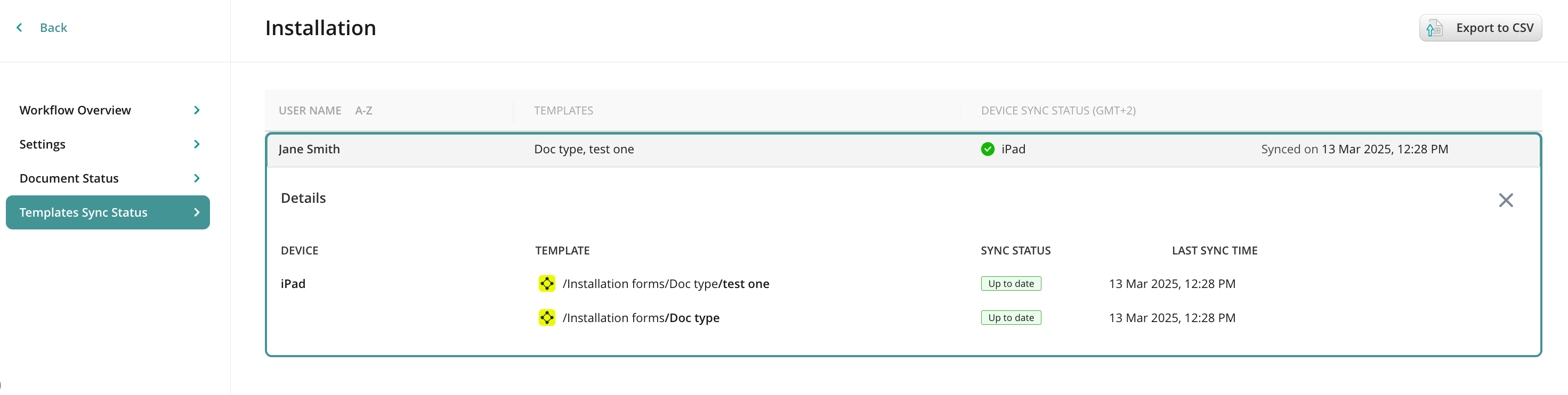
- Up to date (green checkmark) — means the device is fully synchronized with the company server and the user has the latest copies of template documents.
- Outdated (red cross) — shows that either the user hasn’t logged in to the app yet or the sync hasn’t been completed properly.
- Not available (yellow exclamation mark) — is displayed for the storages that are synced directly to the device and their sync status is not available (FTP, SFTP, Share File).
Click on the user to see full details with the list of devices, storage names and sync statuses, and the time of the last sync:
Was it helpful? Feel free to contact us at support@fluix.io if you have any questions or comments.