


Does your business process entail a need in DMS (Document management system) and CRM (Сustomer relationship management) systems, but you have to copy-paste data from one to another? There is a way to automate this process by integrating these tools.
How it works
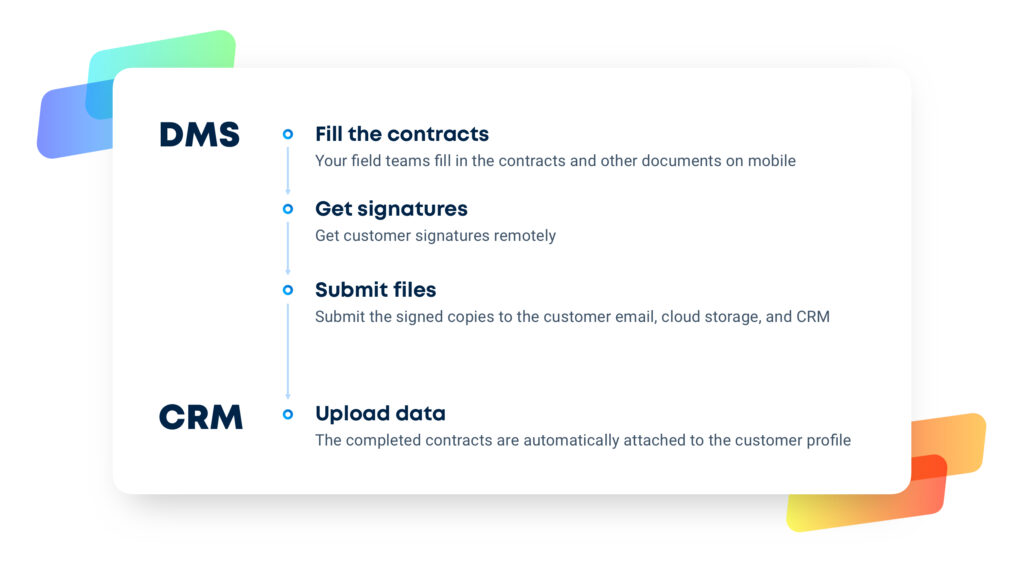
While using Fluix as a DMS, you can automate the upload of data collected in mobile forms into the CRM of your choice, like Lead Perfection, MarketSharp, Salesforce, and other world-leading systems.
Gains from integration with CRM
- Automated workflow. Assurance that documents are getting directly to CRM as soon as such are completed, eliminates time waste on manual upload of documents and data entry, reduces mistakes, and frees up your staff to focus on high value-added tasks.
- Real-time control. The regular update of the document status in the system makes it easy to track the work progress.
- Increased security. With a centralized place for data storage there is no need to control the data transfer across different platforms and keep completed documents on the external storage for an extended period of time.
- Saved time. Service and production teams have instant access to completed documents on their mobile device, which significantly speeds up work on site. There is no need to search through shared folders anymore since company management can pull out any contract/item on any customer quickly.
To integrate Fluix with your CRM, please proceed to this article. Feel free to contact us at support@fluix.io if you have any questions or comments.
If you don’t have Fluix account yet, our experts will be happy to answer any of your questions.
Learn how Fluix works for teams in various industries.
Make your tools speak to each other
See how Fluix can work for you.